
1. Introduction

What Time Zone Orbit is and how it helps you plan meetings across time zones.
1.1 What Time Zone Orbit does
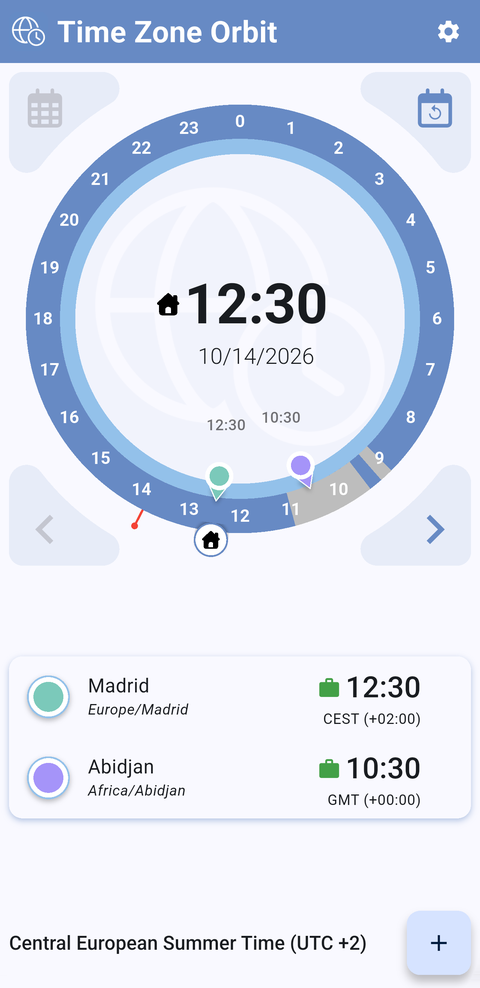
Time Zone Orbit helps you find a time for a meeting with people in other time zones. It shows up to four cities on one interactive 24-hour dial, tells you at a glance whether each of them is within working hours or at night, and draws the events of your calendar on the dial so you can see which slots are already taken.
1.2 Key benefits
- One gesture for every time zone: turn the dial and see the time in all your cities at the same moment.
- Who is available, at a glance: an icon next to each city and the color of the dial tell you whether a time falls within working hours or at night.
- Your agenda on the clock: the events of your calendar are drawn on the dial, so you see whether you are free at that time.
- From time to meeting: join a video call, phone in or start a new meeting in your calendar, straight from the app.
- No account needed: the app reads a calendar that is already on your phone.
- Free and without ads: no purchases, no subscriptions and no advertising, and your data stays on your phone.
1.3 Features
- Orbit dial with up to four cities, each with its own color.
- Working hours and night hours, with a status icon for each city and an inner ring that turns amber when someone is unavailable.
- Highlighted city: its time in the middle of the dial and its working hours on the ring.
- Any day from today to one year ahead, and a button to go back to now.
- The events of one calendar of your choice on the dial and in each city's details.
- City details with availability checks and a day-by-day timeline of your events.
- Join and Call buttons for the video call links and phone numbers found in an event.
- City aliases, color palettes, events color and date format.
- Available in English, Spanish and Galician.
1.4 Free, no ads and private
- Free: Time Zone Orbit is free to download and use. There are no in-app purchases or subscriptions, and every feature is available from the start.
- No ads: the app shows no advertising of any kind.
- Your data stays on your phone: your cities, aliases and settings are saved only on your device. The app reads your calendar on the phone to draw your events, and never changes them or sends them anywhere.
- No tracking: there is no account or sign-up and no usage analytics, and your data is never sold or used for advertising.
- The only things sent: if the app stops because of an error, a technical report of the error is sent to TICGAL (Firebase Crashlytics) so it can be fixed; it describes the error and the device, not your events or your cities. When it starts, the app also checks Google Play to see whether there is a new version.
See the Privacy policy for the details.
Part of the Time Zone Orbit manual — see also 2. What's New, 3. Scope, 4. Setup, 5.1 Home screen, 5.2 The Orbit dial, 5.3 Managing cities, 5.4 City details and events, 5.5 Settings, 6. Troubleshooting.
Generated for Time Zone Orbit 1.2.0 on Android — 2026-10-14.