
4.2 Permissions

4.2.1 Permissions
Domain Manager rights (Profiles tab)
DNS record write-back is granted per record type. A cell is a right you tick on the profile; a dash means the type has no such right.
| Right | A | AAAA | CNAME | TXT |
|---|---|---|---|---|
| Create | Yes | Yes | Yes | Yes |
| Update | Yes | Yes | Yes | Yes |
| Delete | Yes | Yes | Yes | Yes |
| Purge | Yes | Yes | Yes | Yes |
One more right applies to every record type: Unlock imported domain data lets a profile edit fields and records that were written by a sync. MX and other types are read-only.
Rights used by other actions
| Action | Rights needed |
|---|---|
| Save a supplier's driver, Check Connection, discover domains | Update on the Supplier |
| Import discovered domains | Update on the Supplier and Create on Domains |
| Sync now on a domain | Update on Domains |
Others
- Standard
configright — required to access Setup > Automatic actions and configure the two cron tasks.
4.2.2 Granting Domain Manager rights to a profile
Domain Manager adds its own rights to GLPI’s profile system. A profile has no access to the plugin’s protected actions until an administrator grants them here — this is the first thing to check if a user reports missing DNS record buttons or an un-editable synced field.
4.2.2.1 Open the profile to edit
Go to Administration → Profiles and open the profile to grant rights to — here, Technician.
4.2.2.2 Open the Domain Manager tab
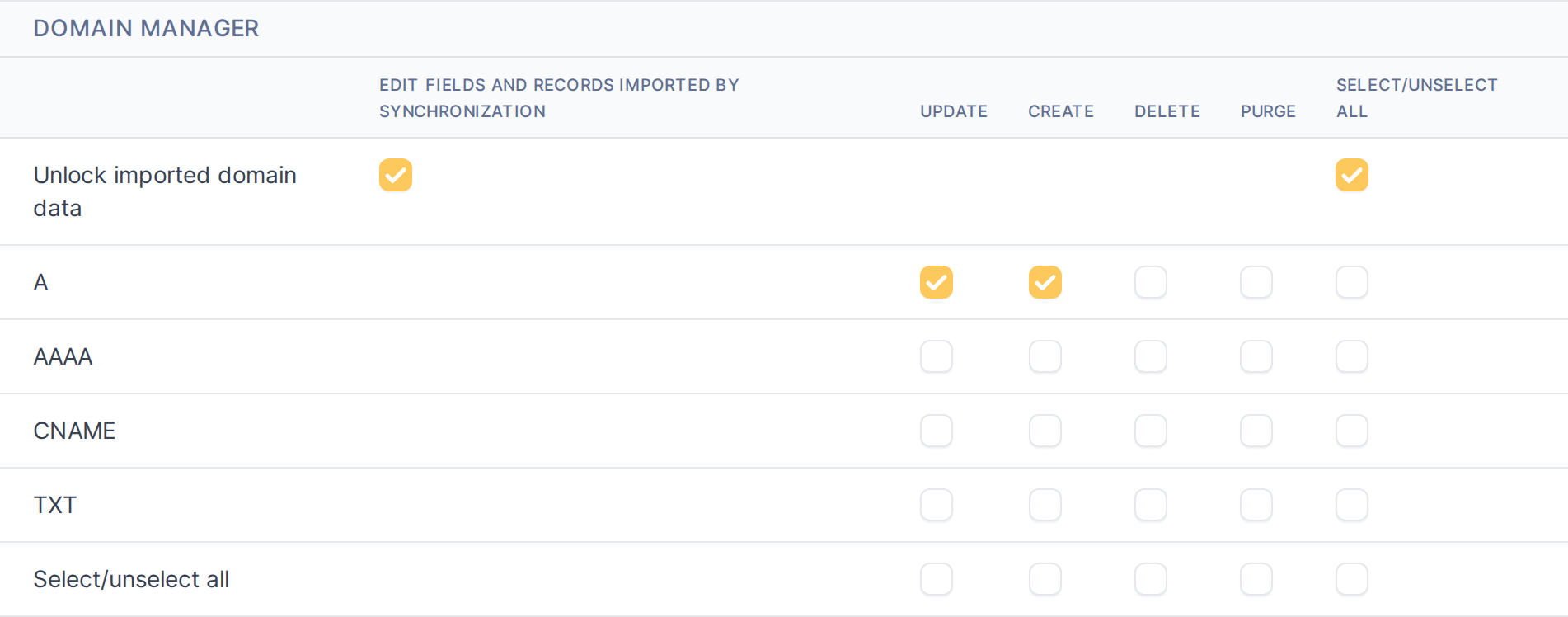
Select the Domain Manager tab. It lists every right the plugin defines: unlocking fields and records that came from a synchronization, and per-record-type write-back rights (Create/Update/Delete/Purge) for each DNS record type the plugin can push to a provider.
The Domain Manager rights matrix, before any right is granted
4.2.2.3 Grant unlock and A-record write-back rights
Tick Edit fields and records imported by synchronization to let this profile override plugin-managed locks on the native form, and tick Create/Update on the A record row to let it push new and changed A records to the provider. Leave the other record types and the destructive Delete/Purge bits unchecked — grant only what a role actually needs.
Unlock and A-record Create/Update ticked, not yet saved
4.2.2.4 Save the profile
Click Save. The rights take effect immediately for every user with this profile.
Note: Delete and Purge are separate bits from Create/Update on each record-type right: a profile can be trusted to push new and changed records without also being able to remove them from the provider.
Generated for Domain Manager 1.8.0-beta.4 on GLPI 11.0 — 2026-10-20.