
3. Scope

Reference only — see 4. Setup for how to configure each of these.
3.1 Assets, management & administration items
Assets
- Domain
- Domain Record
Management
- Supplier (adds a "Domain Manager" tab: API driver/credentials, linked domains)
Administration
- Profiles (adds a "Domain Manager" rights tab)
Setup
- General (adds a "Domain Manager" configuration tab)
- Automatic actions (2 new cron tasks)
- Dropdowns: Domain Type (1 type auto-seeded). Domain Record Type's 11 values (A, AAAA, ALIAS, CNAME, MX, NS, PTR, SOA, SRV, TXT, CAA) are native GLPI dropdown data, not injected by this plugin — it only re-creates one if an administrator deleted it.
3.2 Automatic actions
| Name | Affected action | Recommended execution |
|---|---|---|
| DomainSync | Syncs registration lifecycle and DNS records for a batch of domains, oldest-synced first (default batch size: 2 domains/run, tunable from Setup > Automatic actions) | Every 30 minutes |
| RdapEnrichment | Looks up missing RDAP data for one domain per run (max 1 lookup/domain/day) | Every 15 minutes |
RDAP usage and etiquette
Domain Manager's RDAP enrichment queries rdap.org, a free public service that resolves the correct registry RDAP server for each domain. It is a courtesy service run by Gavin Brown, a third party not affiliated with Domain Manager or GLPI. Two hardcoded limits keep the plugin's traffic conservative by default: one lookup per domain per minute, and one RdapEnrichment run every 15 minutes processing at most one domain — so a single install cannot realistically exceed rdap.org's own rate limits.
Note: If you manage a very large number of domains and are likely to generate sustained RDAP traffic, consider querying the IANA bootstrap registries directly, or running your own local RDAP instance (rdap.org publishes one you can start with
docker compose up). This keeps your traffic off the shared public service and avoids the risk of hitting its rate limits or those of the underlying registries. If rdap.org's service is useful to you, its maintainer also welcomes support via ko-fi.com/rdaporg.
See 4.1.2 Configuration.
3.3 Notifications
None — the plugin does not use GLPI's notification system. Sync activity and errors are written to dedicated activity/error logs instead.
3.4 Rules
None — Domain Manager does not add criteria or actions to GLPI's Rules engine.
3.5 Permissions
Domain Manager rights (Profiles tab)
DNS record write-back is granted per record type. A cell is a right you tick on the profile; a dash means the type has no such right.
| Right | A | AAAA | CNAME | TXT |
|---|---|---|---|---|
| Create | Yes | Yes | Yes | Yes |
| Update | Yes | Yes | Yes | Yes |
| Delete | Yes | Yes | Yes | Yes |
| Purge | Yes | Yes | Yes | Yes |
One more right applies to every record type: Unlock imported domain data lets a profile edit fields and records that were written by a sync. MX and other types are read-only.
Rights used by other actions
| Action | Rights needed |
|---|---|
| Save a supplier's driver, Check Connection, discover domains | Update on the Supplier |
| Import discovered domains | Update on the Supplier and Create on Domains |
| Sync now on a domain | Update on Domains |
Others
- Standard
configright — required to access Setup > Automatic actions and configure the two cron tasks.
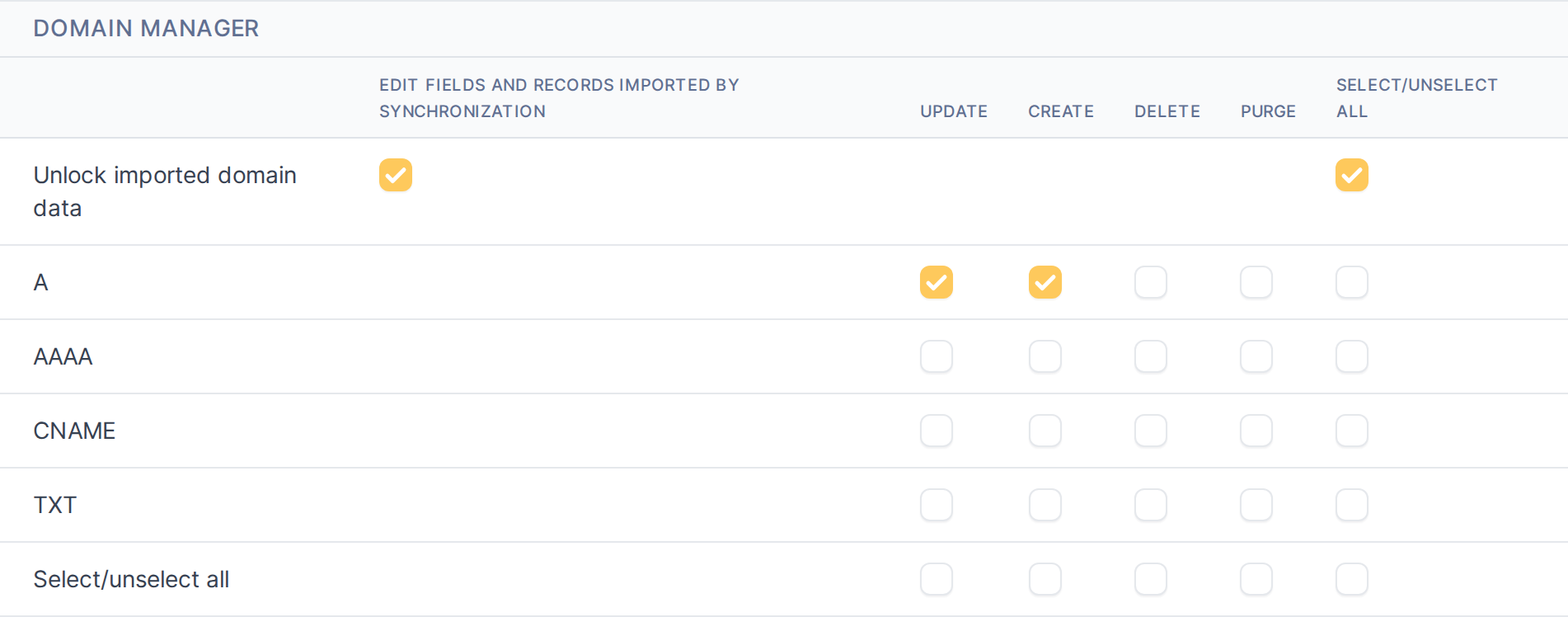
See 4.2.1 Permissions.
3.6 Other elements
Dashboard and widgets
- Dashboard: a "Domain Manager" dashboard, installed once with a ready-made layout (Home > dashboard selector). It is never changed after install, so edit it freely.
- Dashboard cards, all in the "Domain Manager" group when you add a card in a dashboard's Edit mode:
- Totals: Number of Managed Domains, Number of Managed Records, Number of Domains expiring soon (less than 30 days), Domains at renewal risk, Domains not synced recently, Records only in GLPI, Proxied records.
- Domains: Managed domains per registrar, per DNS provider, by TLD, per registrar by TLD, per registrar and DNS provider, and by expiration.
- Status: DNS sync status, DNS sync status per DNS provider, Registrar sync status and Domain protections (DNSSEC, domain lock, transfer lock, WHOIS privacy).
- Records: Managed records by type, by DNS provider, and per DNS provider by type.
- Chart cards are clickable: a segment opens the Domain search already filtered to match it.
Generated for Domain Manager 1.8.0-beta.4 on GLPI 11.0 — 2026-10-20.