
4.1 General setup

4.1.1 Installation
From a release archive
- Copy the plugin folder into GLPI's
plugins/directory asdomainmanager. A release archive already ships itsvendor/directory (onlyphp-domain-parser; the Cloudflare/IONOS/Dinahosting drivers call each provider's REST API directly over Guzzle, there are no vendor SDKs) — nocomposer installneeded. - In GLPI, go to Setup > Plugins, install and enable "Domain Manager".
From source (git clone)
- Copy/clone the plugin folder into GLPI's
plugins/directory asdomainmanager. - Run
composer install --no-devinside the plugin folder to install dependencies — a source checkout has novendor/directory. - In GLPI, go to Setup > Plugins, install and enable "Domain Manager".
Marketplace
Install and enable from the GLPI Marketplace like any other plugin (no extra steps required).
4.1.2 Configuration
- Setup > General > Domain Manager: set the default Domain Type for imported domains, optionally enable global read-only mode, and set the sync safety-guard thresholds (max record count/percentage allowed to trash per sync). This page also shows a read-only RDAP enrichment status display (pending count, last processed time).
- Suppliers > [pick a supplier] > Domain Manager: choose the API driver (Cloudflare, IONOS, or Dinahosting) and enter credentials, then click "Check Connection" to validate.
- Setup > Automatic actions: both tasks default to CLI mode (system cron /
bin/console glpi:cron) rather than GLPI's internal scheduler on a fresh install — switch a task to the internal scheduler here if you'd rather not run a system cron. Also where the DomainSync batch size and either task's run frequency are tuned. - Administration > Profiles > Domain Manager: grant the unlock right and per-record-type write-back permissions to the relevant profiles.
4.1.2.1 Automatic actions
| Name | Affected action | Recommended execution |
|---|---|---|
| DomainSync | Syncs registration lifecycle and DNS records for a batch of domains, oldest-synced first (default batch size: 2 domains/run, tunable from Setup > Automatic actions) | Every 30 minutes |
| RdapEnrichment | Looks up missing RDAP data for one domain per run (max 1 lookup/domain/day) | Every 15 minutes |
RDAP usage and etiquette
Domain Manager's RDAP enrichment queries rdap.org, a free public service that resolves the correct registry RDAP server for each domain. It is a courtesy service run by Gavin Brown, a third party not affiliated with Domain Manager or GLPI. Two hardcoded limits keep the plugin's traffic conservative by default: one lookup per domain per minute, and one RdapEnrichment run every 15 minutes processing at most one domain — so a single install cannot realistically exceed rdap.org's own rate limits.
Note: If you manage a very large number of domains and are likely to generate sustained RDAP traffic, consider querying the IANA bootstrap registries directly, or running your own local RDAP instance (rdap.org publishes one you can start with
docker compose up). This keeps your traffic off the shared public service and avoids the risk of hitting its rate limits or those of the underlying registries. If rdap.org's service is useful to you, its maintainer also welcomes support via ko-fi.com/rdaporg.
4.1.3 Configuring Domain Manager
A few settings apply to the whole plugin rather than to one supplier or domain. They live on a single page, split into General options and Advanced settings.
4.1.3.1 Open the configuration page
Go to Setup → General and open the Domain Manager tab. The page has two sections, General options and Advanced settings.
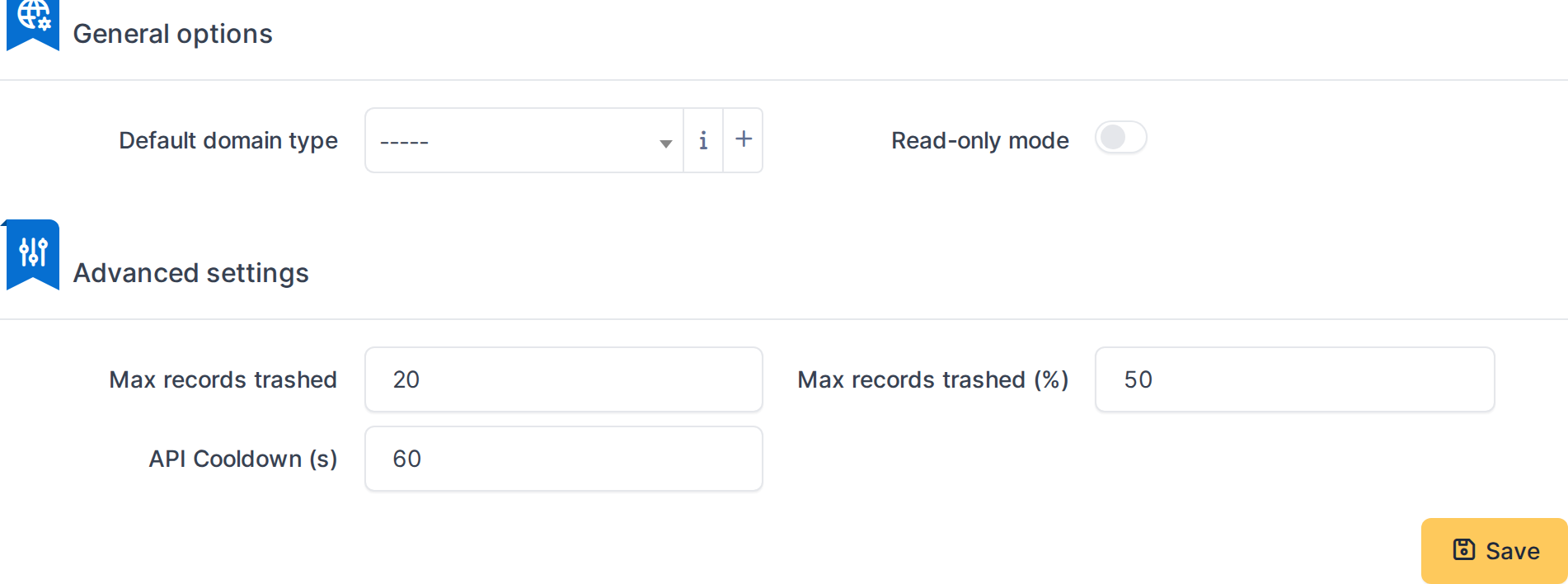
The Domain Manager configuration page
4.1.3.2 General options
- Default domain type — the type given to domains Domain Manager creates, for example when you import them from a supplier.
- Read-only mode — when on, Domain Manager never changes anything at a DNS provider, whatever rights a user holds. Synchronization and reading keep working. Turn it on while you test, or in an emergency.
4.1.3.3 Advanced settings
- Max records trashed and Max records trashed (%) — a safety guard for synchronization. If a sync would remove more records than either limit from one domain, it stops and leaves the domain untouched instead.
- API Cooldown (s) — the pause, in seconds, enforced between repeated Sync, RDAP and connection-test requests. The default is 60.
Click Save to apply your changes.
Generated for Domain Manager 1.8.0-beta.4 on GLPI 11.0 — 2026-10-20.