
1. Introduction
1.1 What JS Addons does
JS Addons lets you add popular web services to GLPI without touching its code. It ships three ready-made addons, Metricool and Google Analytics for web analytics and Tawk.to for a live chat, and loads each one by inserting the JavaScript the service asks for. You paste the key of your account, switch the addon on, and decide whether it runs only on the login page or also inside GLPI.
1.2 Key benefits
- No code to edit — the snippet of each service is ready; you only paste your key.
- Three services out of the box — web analytics with Metricool or Google Analytics, and a live chat with Tawk.to.
- Safe by default — new addons run only on the login page, so the third-party code never runs inside GLPI unless you decide so.
- Checked keys — a key is saved only if it has the format of its service, which keeps stray text out of the page.
- Easy to pause — switch an addon off and its key is kept for later.
- Managed from GLPI — one list under the Setup menu, with the same password confirmation as the GLPI configuration.
1.3 Features
- A JS Addons entry in the Setup menu, with the list of the supported addons.
- Three addons: Metricool, Tawk.to and Google Analytics.
- Active: switches an addon on or off.
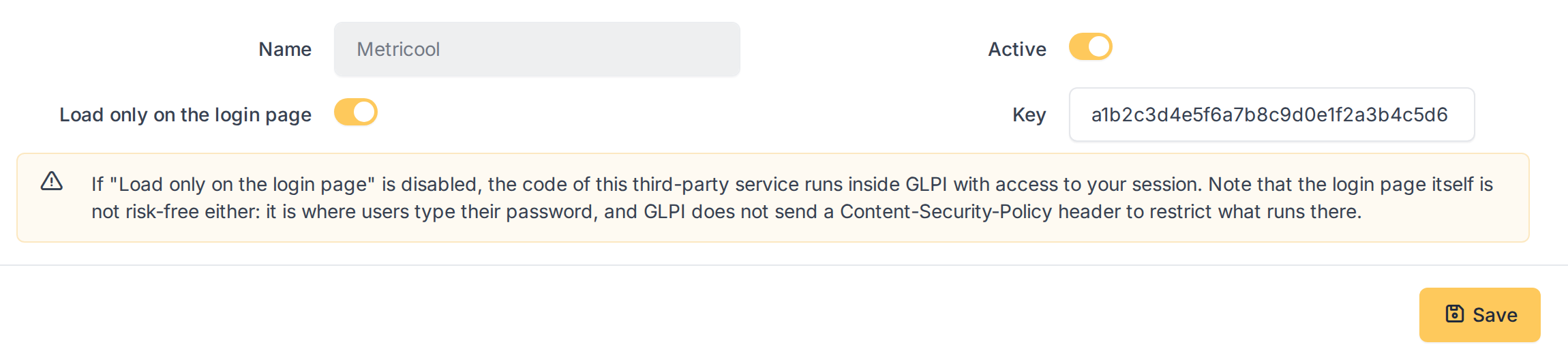
- Key: the identifier of your account in the service, validated against the format of that service.
- Load only on the login page: on by default for new addons; when off, the addon also runs in every GLPI page.
- A warning in the form about running third-party code inside GLPI.
- Password confirmation before the list and the forms are shown.
Generated for JS Addons 4.0.0 on GLPI 12.0.2 — 2026-11-20.