
5.4 Word of the day

A new word every day, and how to turn it off.
5.4.1 The Word of the day
The Word of the day shows you a random entry from the dictionary once a day, the first time you open the app. It is a simple way to discover new words. It is not shown on the very first launch of the app, so that it does not cover the tutorial.
5.4.1.1 Use the Word of the day
The word is shown in a window over the search screen, with an orange Word of the day label on top. It is a normal result card, so you can tap the speaker button to listen to it, Copy to copy the definition or Save to add it to your favorites. See 5.3 Reading a definition.
To close the window, tap the ✕ in the top-right corner.
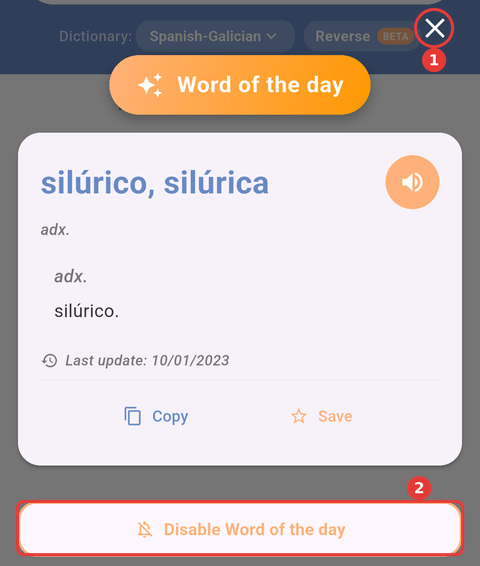
The Word of the day, "silúrico, silúrica", from the Spanish-Galician dictionary: (1) ✕ closes the window and (2) Disable Word of the day turns it off.
Note: The word is taken from your default dictionary (Settings → Default dictionary). If the app can't get the word, for example because there is no Internet connection, it tries again the next time you open it that day.
5.4.1.2 Turn it off
If you don't want the Word of the day to appear when you open the app, you can turn it off in two ways:
- From the window: tap Disable Word of the day at the bottom of the window. The window closes and the option is turned off in Settings.
- From Settings: open Settings with the gear icon on the search screen and turn off Word of the day.
To see it again, turn Settings → Word of the day back on. See 5.6 Settings.
Part of the RinoDicionarios manual — see also 1. Introduction, 2. What's New, 3. Scope, 4. Setup, 5.1 Home screen, 5.2 Searching the dictionaries, 5.3 Reading a definition, 5.5 Favorites, 5.6 Settings, 6. Troubleshooting.
Generated for RinoDicionarios 1.1.0 on Android & iOS — 2026-10-19.