# BSM
BSM (Business Service Manager) lets you model the services your organisation delivers or depends on, and see how they connect to the assets that support them.
# Getting Started
# 1. Introduction

*Part of the **BSM** manual — see also [2. What's New](https://docs.tic.gal/books/bsm/page/2-whats-new), [3. Scope](https://docs.tic.gal/books/bsm/page/3-scope), [4. Setup](https://docs.tic.gal/books/bsm/page/4-setup), [5.1 How to use](https://docs.tic.gal/books/bsm/page/51-how-to-use), [5.2 Business Services](https://docs.tic.gal/books/bsm/page/52-business-services), [5.3 Application Services](https://docs.tic.gal/books/bsm/page/53-application-services), [5.4 Service Map](https://docs.tic.gal/books/bsm/page/54-service-map), [5.5 RACI Matrix](https://docs.tic.gal/books/bsm/page/55-raci-matrix), [5.6 RACI summaries](https://docs.tic.gal/books/bsm/page/56-raci-summaries), [6. Troubleshooting](https://docs.tic.gal/books/bsm/page/6-troubleshooting).*
## 1.1 What BSM does
BSM (Business Service Manager) lets you model the services your organisation delivers or depends on, and see how they connect to the assets that support them. It introduces two new record types — Business Services and Application Services — and a Service Map that draws the live dependency chain between them and the GLPI assets underneath, so an incident on a piece of hardware or software can be traced up to the business service it ultimately affects.
## 1.2 Key benefits
- GLPI tracks individual assets well, but has no native way to answer "which business services does this server actually support, and who is accountable for them?" — that link had to be kept in someone's head or a spreadsheet.
- Nothing recorded who was Responsible, Accountable, Consulted or Informed (RACI) for a service — assignments lived in tickets, emails or institutional memory, not in one place anyone could check.
- Tracing the impact of a change or an outage meant piecing together which assets fed which service by hand, with no diagram or dependency chain to look at.
- There was no single, filterable view of every service's actors at once — auditing who held which role across the whole organisation meant opening one record at a time.
- Finding out what you personally were on the hook for meant asking around or searching every service one by one — there was no page that simply listed it.
## 1.3 Features
1. Model Business Services and Application Services as first-class GLPI records, each classified by type and scope.
2. Assign Responsible, Accountable, Consulted and Informed actors (users, groups, suppliers) directly on each service's own form.
3. Check every service's RACI assignments at once, filtered by role or by linked service, from a single RACI Matrix page.
4. Recap a single service's own actors from a "Service RACI" tab on its record, with a link straight to its row on the Matrix.
5. Look up every service a user, group or supplier is named on from a "My RACI" (own Preferences) or "RACI (as actor)" (another User/Group/Supplier) tab.
6. Draw the dependency chain from Business Services down through Application Services to the underlying GLPI assets, as a diagram with grouping, a legend and a fullscreen mode.
7. Configure which asset types feed the map, how those types are grouped into tiers, and how the map's canvas behaves (layout, zoom sensitivity, summary thresholds).
8. Fill in an Application Service's empty Responsible/Accountable fields from its linked Business Service with one "Copy actors from Business Service" button, instead of typing them twice.
> Generated for **BSM 0.21.0-beta.1** on GLPI 11.0.8 — 2026-09-13.
# 2. What's New

*Part of the **BSM** manual — see also [1. Introduction](https://docs.tic.gal/books/bsm/page/1-introduction), [3. Scope](https://docs.tic.gal/books/bsm/page/3-scope), [4. Setup](https://docs.tic.gal/books/bsm/page/4-setup), [5.1 How to use](https://docs.tic.gal/books/bsm/page/51-how-to-use), [5.2 Business Services](https://docs.tic.gal/books/bsm/page/52-business-services), [5.3 Application Services](https://docs.tic.gal/books/bsm/page/53-application-services), [5.4 Service Map](https://docs.tic.gal/books/bsm/page/54-service-map), [5.5 RACI Matrix](https://docs.tic.gal/books/bsm/page/55-raci-matrix), [5.6 RACI summaries](https://docs.tic.gal/books/bsm/page/56-raci-summaries), [6. Troubleshooting](https://docs.tic.gal/books/bsm/page/6-troubleshooting).*
## Unreleased
### New
- Every service's own form now has a single **Actors** section covering Responsible, Accountable, Consulted and Informed — see [5.2 Business Services](https://docs.tic.gal/books/bsm/page/52-business-services) and [5.3 Application Services](https://docs.tic.gal/books/bsm/page/53-application-services). Consulted and Informed can hold several users and groups; Application Services can also name several Suppliers as Consulted.
- The **RACI Matrix** page is now a full-width, read-only overview of every Business Service and its Application Services, with a filter per role (Responsible/Accountable/Consulted/Informed) and a filter by linked service — see [5.5 RACI Matrix](https://docs.tic.gal/books/bsm/page/55-raci-matrix). Actors are assigned from each service's own form, not from the Matrix.
- Added a **CSV export** to the RACI Matrix that respects the current filters.
- Added a **Service RACI** tab on every Business Service and Application Service — a read-only recap of that one service's actors, with a link straight to its row on the Matrix — see [5.6 RACI summaries](https://docs.tic.gal/books/bsm/page/56-raci-summaries).
- Added **My RACI** (on your own Preferences) and **RACI (as actor)** (on another User, a Group, or a Supplier) tabs, listing every service that person, team or supplier is an actor for, and in which role — see [5.6 RACI summaries](https://docs.tic.gal/books/bsm/page/56-raci-summaries).
- Both Business and Application Services can now name a Supplier as part of Accountable, alongside the usual user/group.
- Added a fullscreen button to the Service Map canvas.
- Added a Legend panel to the Service Map explaining tier colours, badge colours and the network equipment border style.
- Group boxes on the Service Map now show which grouping was used (e.g. "Role: Entry Point").
- "Group by: Cluster (Appliance)" is now two separate options, Appliance and Cluster, since they're different things in GLPI.
- Added a Zoom step setting (Setup > General > BSM) to control how fast the mouse wheel zooms the Service Map.
- Application Services on the Service Map now show a different avatar colour per environment (Production, Pre-production, Development, Test), documented in the Legend.
- Application Service's Accountable now has its own dedicated owner/group fields instead of showing the same names as Responsible.
- Application Service form: added a "Copy actors from Business Service" button that fills in empty Responsible/Accountable fields from the linked Business Service — see [5.3 Application Services](https://docs.tic.gal/books/bsm/page/53-application-services).
### Fixed
- Fixed the Service Map / Impact Analysis diagram: with a "Group by" option active (the default), most nodes could end up missing or stacked invisibly on top of each other instead of spread out in their groups.
- Fixed selecting "Group by: Contract", "Domain" or "Cluster (Appliance)" silently behaving as if "Role" were still selected.
- Fixed item names containing "&", "<" or similar characters showing their literal escaped code instead of the actual character on the Service Map.
- Fixed each item's itemtype icon not appearing inside its avatar on the Service Map.
- Fixed the corner badge on Service Map avatars being cropped.
- Fixed Service Map captions overlapping the row below instead of sitting neatly beside each node.
> Generated for **BSM 0.21.0-beta.1** on GLPI 11.0.8 — 2026-09-13.
# 3. Scope

*Part of the **BSM** manual — see also [1. Introduction](https://docs.tic.gal/books/bsm/page/1-introduction), [2. What's New](https://docs.tic.gal/books/bsm/page/2-whats-new), [4. Setup](https://docs.tic.gal/books/bsm/page/4-setup), [5.1 How to use](https://docs.tic.gal/books/bsm/page/51-how-to-use), [5.2 Business Services](https://docs.tic.gal/books/bsm/page/52-business-services), [5.3 Application Services](https://docs.tic.gal/books/bsm/page/53-application-services), [5.4 Service Map](https://docs.tic.gal/books/bsm/page/54-service-map), [5.5 RACI Matrix](https://docs.tic.gal/books/bsm/page/55-raci-matrix), [5.6 RACI summaries](https://docs.tic.gal/books/bsm/page/56-raci-summaries), [6. Troubleshooting](https://docs.tic.gal/books/bsm/page/6-troubleshooting).*
Reference only — see [4. Setup](https://docs.tic.gal/books/bsm/page/4-setup) for how to configure each of these.
## 3.1 Definitions
- **Business Service** — a Tier 1 record representing something the organisation delivers or depends on as a whole, such as a customer portal or a payroll run.
- **Application Service** — a Tier 2 record representing a specific application or system that supports one or more Business Services.
- **RACI** — the four roles a person, group or supplier can hold against a service: **R**esponsible (does the work), **A**ccountable (answers for the outcome), **C**onsulted (asked for input), **I**nformed (kept up to date). BSM lets several users, groups and suppliers hold the Consulted and Informed roles at once; Responsible and Accountable are each a single user/group (plus, for Accountable, an optional supplier).
- **Service Map** — the diagram view showing how Business Services, Application Services and the GLPI assets under them connect.
## 3.2 Assets, management & administration items
- Assets and other GLPI items that a service links to (servers, network equipment, software installations, and others as configured) — BSM reads these to build the Service Map; it does not modify them.
- Users, Groups and Suppliers — assigned to services as RACI actors.
- Manufacturers and States — an Application Service records its publisher (Manufacturer) and status (State); a State must be explicitly marked visible for Application Services (in **Setup > Dropdowns > State**, or the State's own form) before it appears as a choice.
## 3.3 Automatic actions
_None._
See [4.2 Configuration](https://docs.tic.gal/books/bsm/page/4-setup).
## 3.4 Notifications
_None._
## 3.5 Rules
_None._
## 3.6 Permissions
BSM adds its own rights, set per profile under the plugin's tab on **Administration > Profiles**:
- **Business Service** and **Application Service** — the usual Read/Create/Update/Delete/Purge rights, plus the two notes rights, control who can see and manage each tier's records.
- **Configuration** — Read/Create/Update/Delete/Purge on the Setup > General > BSM screen.
- **RACI Matrix** — Read to view the matrix page, and to view another user's, group's or supplier's "RACI (as actor)" tab. The matrix itself is read-only; actors are assigned from each service's own form, so the Update right on this screen has no effect. A user always sees their own "My RACI" tab regardless of this right.
See [4.3 Permissions](https://docs.tic.gal/books/bsm/page/4-setup).
> Generated for **BSM 0.21.0-beta.1** on GLPI 11.0.8 — 2026-09-13.
# 4. Setup

*Part of the **BSM** manual — see also [1. Introduction](https://docs.tic.gal/books/bsm/page/1-introduction), [2. What's New](https://docs.tic.gal/books/bsm/page/2-whats-new), [3. Scope](https://docs.tic.gal/books/bsm/page/3-scope), [5.1 How to use](https://docs.tic.gal/books/bsm/page/51-how-to-use), [5.2 Business Services](https://docs.tic.gal/books/bsm/page/52-business-services), [5.3 Application Services](https://docs.tic.gal/books/bsm/page/53-application-services), [5.4 Service Map](https://docs.tic.gal/books/bsm/page/54-service-map), [5.5 RACI Matrix](https://docs.tic.gal/books/bsm/page/55-raci-matrix), [5.6 RACI summaries](https://docs.tic.gal/books/bsm/page/56-raci-summaries), [6. Troubleshooting](https://docs.tic.gal/books/bsm/page/6-troubleshooting).*
## 4.1 Installation
Install and activate BSM from **Setup > Plugins**, the same as any other GLPI plugin.
## 4.2 Configuration
BSM's settings live under **Setup > General > BSM**:
- **Item types** — which kinds of GLPI assets are eligible to appear on the Service Map and be linked to an Application Service.
- **Tiers** — how those item types are grouped into ranks (for example, separating network equipment from servers) so the map can lay them out sensibly.
- **Tracked software** — which software installations are followed on the map, since software is usually too numerous to include by default.
- **Canvas settings** — the Service Map's layout style, zoom sensitivity, and the thresholds at which a group of items collapses into a summary badge instead of being drawn individually.
### 4.2.1 Automatic actions
_None._
## 4.3 Permissions
BSM adds its own rights, set per profile under the plugin's tab on **Administration > Profiles**:
- **Business Service** and **Application Service** — the usual Read/Create/Update/Delete/Purge rights, plus the two notes rights, control who can see and manage each tier's records.
- **Configuration** — Read/Create/Update/Delete/Purge on the Setup > General > BSM screen.
- **RACI Matrix** — Read to view the matrix page, and to view another user's, group's or supplier's "RACI (as actor)" tab. The matrix itself is read-only; actors are assigned from each service's own form, so the Update right on this screen has no effect. A user always sees their own "My RACI" tab regardless of this right.
## 4.4 BSM settings
BSM's own settings live under **Setup → General → BSM**. They control which GLPI item types the plugin can link to an Application Service, how those item types are ranked on the Service Map, and how the Service Map itself behaves.
### 4.4.1 Open the BSM settings
Choose **Setup → General**, then the **BSM** tab. Changing any setting here requires the Configuration Update right on the plugin.
### 4.4.2 Configuration items
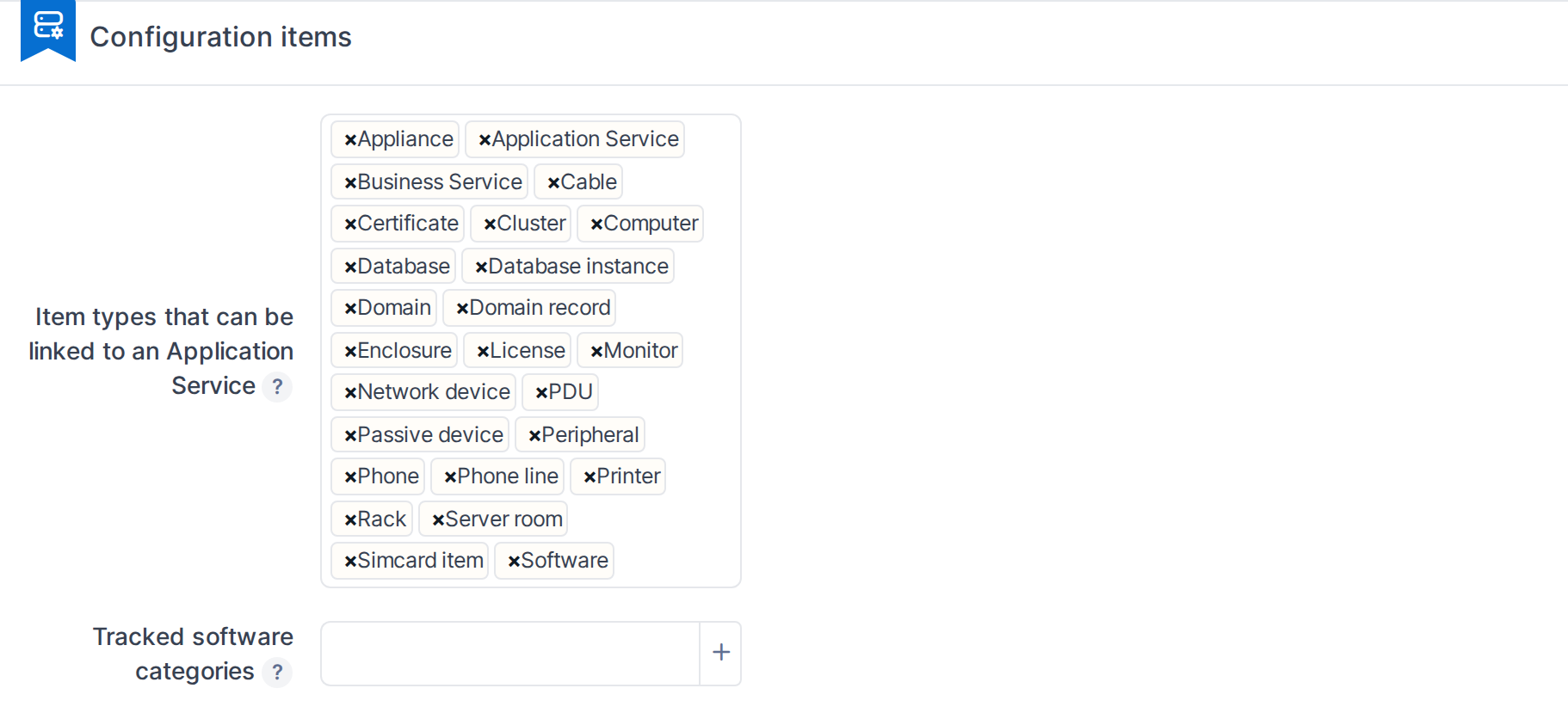
- **Item types that can be linked to an Application Service** — every GLPI asset type checked here gets a Services tab and can be linked from the Service Map. Disabling a type hides its Services tab and blocks new links; links already recorded are kept and shown greyed out.
- **Tracked software categories** — only software in the selected categories (and their subcategories) appears in Software Versions tabs and lists.
*Configuration items*
### 4.4.3 Service map levels
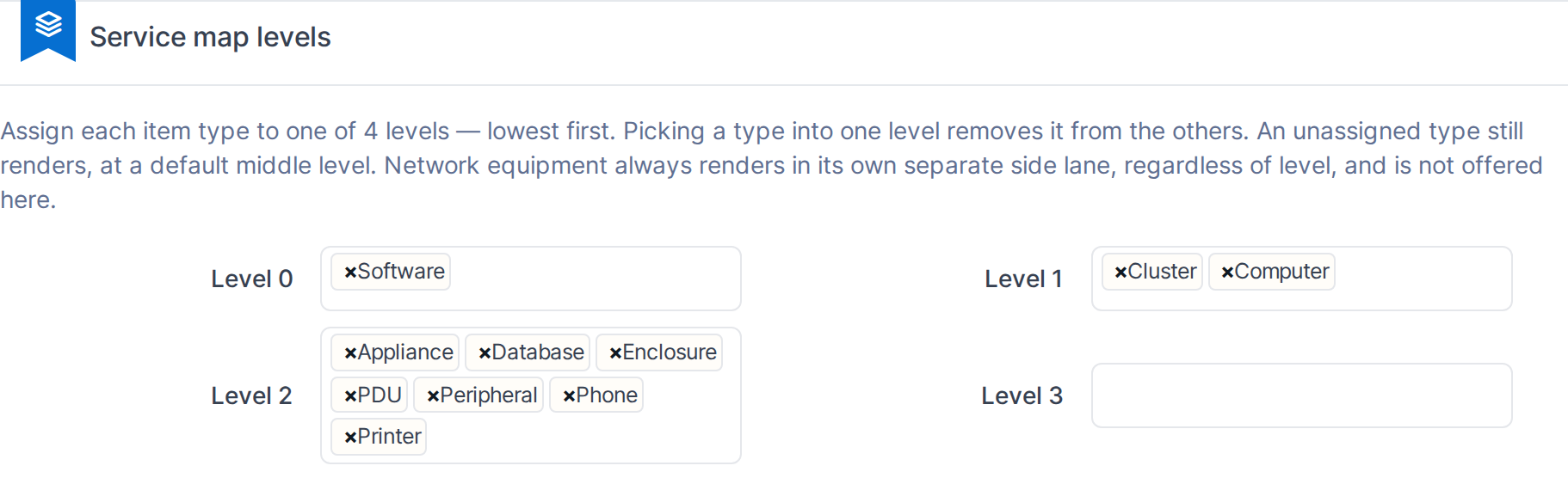
Each linkable item type is assigned to one of four levels, lowest first, which sets its row on the Service Map. Picking a type into one level removes it from the others — a type cannot belong to two levels at once. An unassigned type still renders, at a default middle level. Network equipment always renders in its own side lane regardless of level, and is not offered here.
*Service map levels*
### 4.4.4 Service map canvas settings
- **Layout engine** — the algorithm used to lay out the diagram.
- **Node threshold** — how many children a group can hold before the map collapses it into a summary badge instead of drawing every item.
- **Children per node** — how many items a summary badge shows at a time when expanded.
- **Zoom step** — how much each scroll/pinch changes the zoom level (1-200).

*Service map canvas settings*
> **Note:** Rights for Business Service, Application Service, RACI Matrix and this Configuration screen are set per profile under **Administration → Profiles → BSM**, not on this page.
> Generated for **BSM 0.21.0-beta.1** on GLPI 11.0.8 — 2026-09-13.
# Using BSM
# 5.1 How to use

*Part of the **BSM** manual — see also [1. Introduction](https://docs.tic.gal/books/bsm/page/1-introduction), [2. What's New](https://docs.tic.gal/books/bsm/page/2-whats-new), [3. Scope](https://docs.tic.gal/books/bsm/page/3-scope), [4. Setup](https://docs.tic.gal/books/bsm/page/4-setup), [5.2 Business Services](https://docs.tic.gal/books/bsm/page/52-business-services), [5.3 Application Services](https://docs.tic.gal/books/bsm/page/53-application-services), [5.4 Service Map](https://docs.tic.gal/books/bsm/page/54-service-map), [5.5 RACI Matrix](https://docs.tic.gal/books/bsm/page/55-raci-matrix), [5.6 RACI summaries](https://docs.tic.gal/books/bsm/page/56-raci-summaries), [6. Troubleshooting](https://docs.tic.gal/books/bsm/page/6-troubleshooting).*
### Creating and classifying a service
Open **Management > Business Services** or **Management > Application Services** to see the existing records and add new ones. Every service is classified by **Service type** (Customer-facing or Supporting) and **Customer scope** (Internal or External) — both are mandatory. An Application Service can also be linked to one or more Business Services it supports.
### Assigning RACI actors
Each service's own form has an **Actors** section for its Responsible, Accountable, Consulted and Informed users, groups and suppliers — this is the only place actors are assigned or changed. Four read-only views recap that same data from different angles: the **Service RACI** tab on a single service's own form; the **RACI Matrix** page (under the BSM menu), a filterable overview of every service's assignments at once; and the **My RACI** tab (Preferences) / **RACI (as actor)** tab (on a User, Group, or Supplier record), listing every service that actor is named on.
### Reading the Service Map
The **Service Map** (under the BSM menu, or from a service's own record) draws the dependency chain from Business Services down through Application Services to the underlying assets. Use the **Group by** control to cluster nodes (for example by role or by contract), the **Legend** panel to read the tier colours, badge colours and equipment border styles, and the fullscreen button for a larger working view.
> Generated for **BSM 0.21.0-beta.1** on GLPI 11.0.8 — 2026-09-13.
# 5.2 Business Services

*Part of the **BSM** manual — see also [1. Introduction](https://docs.tic.gal/books/bsm/page/1-introduction), [2. What's New](https://docs.tic.gal/books/bsm/page/2-whats-new), [3. Scope](https://docs.tic.gal/books/bsm/page/3-scope), [4. Setup](https://docs.tic.gal/books/bsm/page/4-setup), [5.1 How to use](https://docs.tic.gal/books/bsm/page/51-how-to-use), [5.3 Application Services](https://docs.tic.gal/books/bsm/page/53-application-services), [5.4 Service Map](https://docs.tic.gal/books/bsm/page/54-service-map), [5.5 RACI Matrix](https://docs.tic.gal/books/bsm/page/55-raci-matrix), [5.6 RACI summaries](https://docs.tic.gal/books/bsm/page/56-raci-summaries), [6. Troubleshooting](https://docs.tic.gal/books/bsm/page/6-troubleshooting).*
A Business Service is a Tier 1 record: something the organisation delivers or depends on, such as a customer-facing portal or an internal payroll run. Every Business Service is classified by who consumes it and how, and can name the people and teams who answer for it.
## 5.2.1 Open the Business Services list
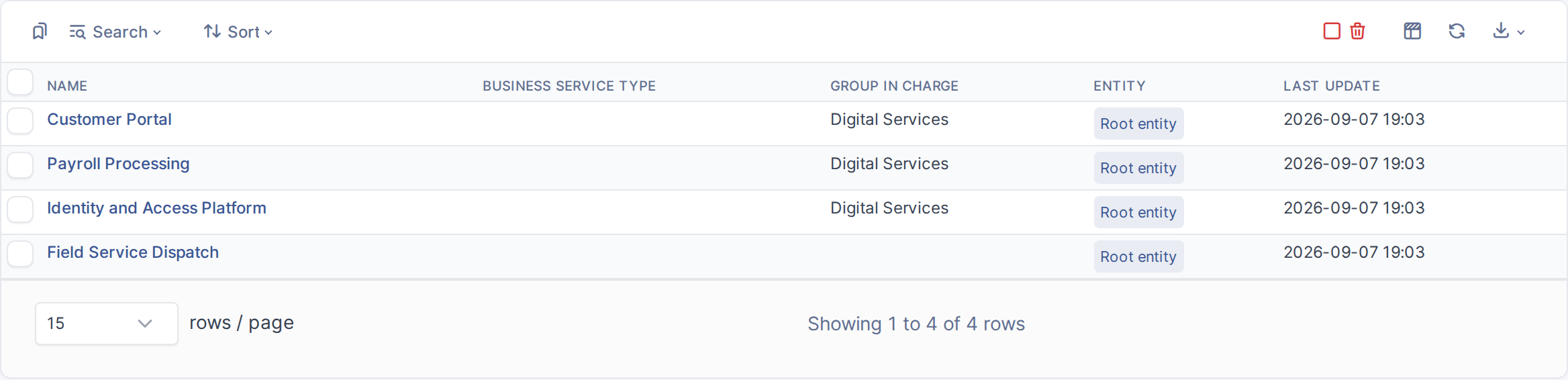
From the main menu choose **Management → Business Services**. Each row shows the service, who owns it, and the group in charge.
*The Business Services list*
## 5.2.2 Open an existing Business Service
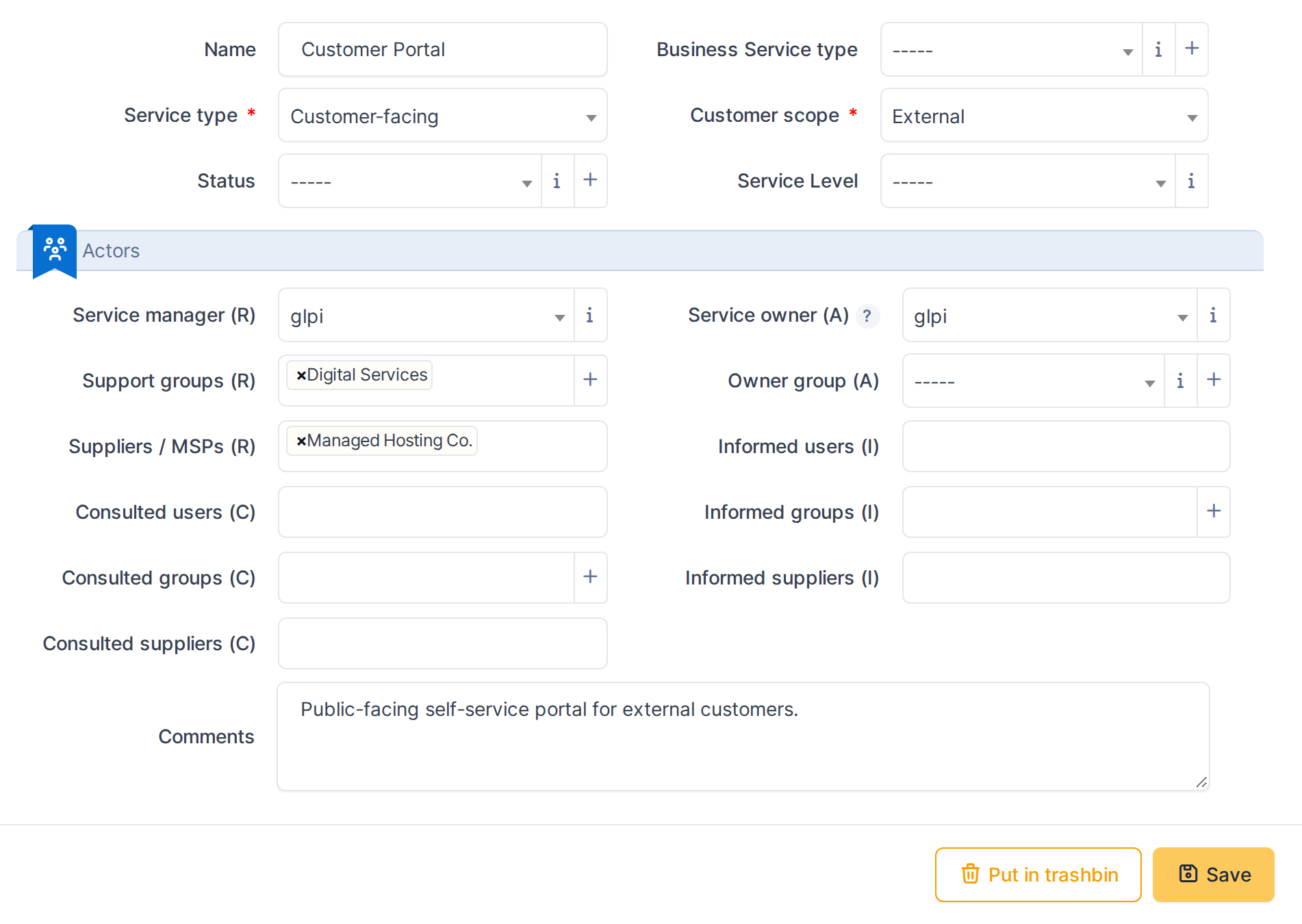
Click a service's name to open its record. This example opens **Customer Portal**.
*A Business Service record*
## 5.2.3 Classify the service
- **Service type** — *Customer-facing* (delivered under an SLA directly to a customer) or *Supporting* (underpins another service rather than being consumed directly). Both this field and Customer scope are mandatory: a service cannot be saved unclassified.
- **Customer scope** — *Internal* (consumed by people inside the organisation) or *External* (consumed by customers outside it).
In this example, **Customer Portal** is Customer-facing and External.

*Service type and customer scope*
## 5.2.4 Assign who answers for the service
- **Business owner** / **Business owner group** — the *Responsible* side: the person and team who run the service day to day. The group list is limited to groups the chosen owner actually belongs to.
- **Technician in charge** / **Supplier in charge** — the *Accountable* side: who signs off on the service and who is accountable if it is run by an external provider.
The unremarkable **Field Service Dispatch** record leaves all four blank — nothing prevents saving a service before its actors are decided.

*Responsible and Accountable actors*
> **Note:** The full Responsible/Accountable/Consulted/Informed assignment, including multiple users and groups per role, is covered in the RACI Matrix chapter.
> Generated for **BSM 0.21.0-beta.1** on GLPI 11.0.8 — 2026-09-13.
# 5.3 Application Services

*Part of the **BSM** manual — see also [1. Introduction](https://docs.tic.gal/books/bsm/page/1-introduction), [2. What's New](https://docs.tic.gal/books/bsm/page/2-whats-new), [3. Scope](https://docs.tic.gal/books/bsm/page/3-scope), [4. Setup](https://docs.tic.gal/books/bsm/page/4-setup), [5.1 How to use](https://docs.tic.gal/books/bsm/page/51-how-to-use), [5.2 Business Services](https://docs.tic.gal/books/bsm/page/52-business-services), [5.4 Service Map](https://docs.tic.gal/books/bsm/page/54-service-map), [5.5 RACI Matrix](https://docs.tic.gal/books/bsm/page/55-raci-matrix), [5.6 RACI summaries](https://docs.tic.gal/books/bsm/page/56-raci-summaries), [6. Troubleshooting](https://docs.tic.gal/books/bsm/page/6-troubleshooting).*
An Application Service is a Tier 2 record: the specific application or platform that delivers a Business Service, such as the identity system behind a customer portal or the batch job that runs payroll. Every Application Service is classified by its environment and status, and can name the people, teams and suppliers who maintain it.
## 5.3.1 Open the Application Services list
From the main menu choose **Management → Application Services**. Each row shows the service's type, publisher, environment and the group in charge.
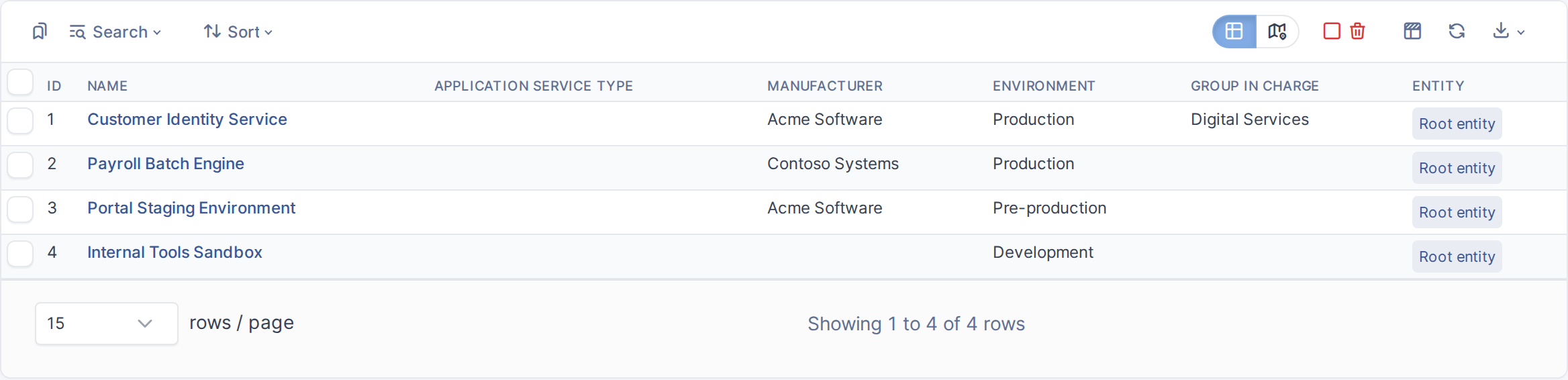
*The Application Services list*
## 5.3.2 Open an existing Application Service
Click a service's name to open its record. This example opens **Customer Identity Service**.
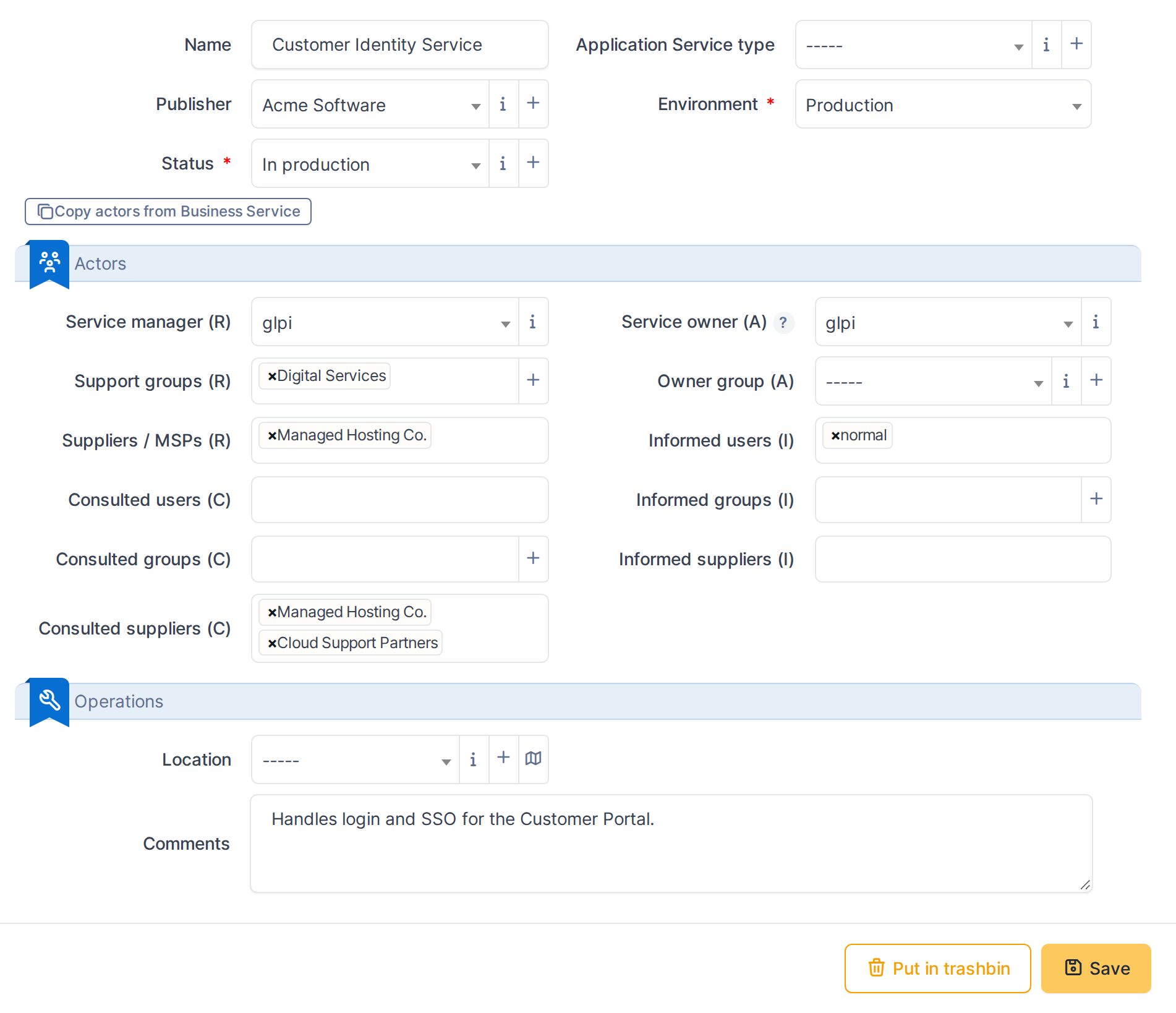
*An Application Service record*
## 5.3.3 Classify the service
- **Publisher** — the manufacturer of the application, an ordinary GLPI dropdown.
- **Environment** — *Production*, *Pre-production*, *Development* or *Test*. Mandatory: a service cannot be saved unclassified.
- **Status** — a GLPI State, filtered to the states an administrator has marked visible for Application Services. Mandatory alongside Environment.
In this example, **Customer Identity Service** is Production, published by Acme Software.

*Publisher, Environment and Status*
## 5.3.4 Assign who maintains the service
- **Technician in charge** / **Group in charge** — the *Responsible* side.
- **Application owner** / **Application owner group** — the *Accountable* side.
- **Supplier in charge** — a single supplier, also part of *Accountable*.
- **Suppliers** (under Consulted) — any number of suppliers who are asked for input; **Customer Identity Service** names both Managed Hosting Co. and Cloud Support Partners here.

*Responsible, Accountable and Consulted actors*
## 5.3.5 Copy actors from a linked Business Service
When an Application Service is linked to exactly one Business Service, its form shows a **Copy actors from Business Service** button. Clicking it fills in any *currently empty* Responsible and Accountable fields from that Business Service — Consulted and Informed are not affected, since RACI Matrix handles those separately. It never overwrites a field that already has a value, and nothing is saved until the form itself is saved.
This example opens **Payroll Batch Engine**, which starts with no actors set, and clicks the button to pull them in from its linked Business Service.
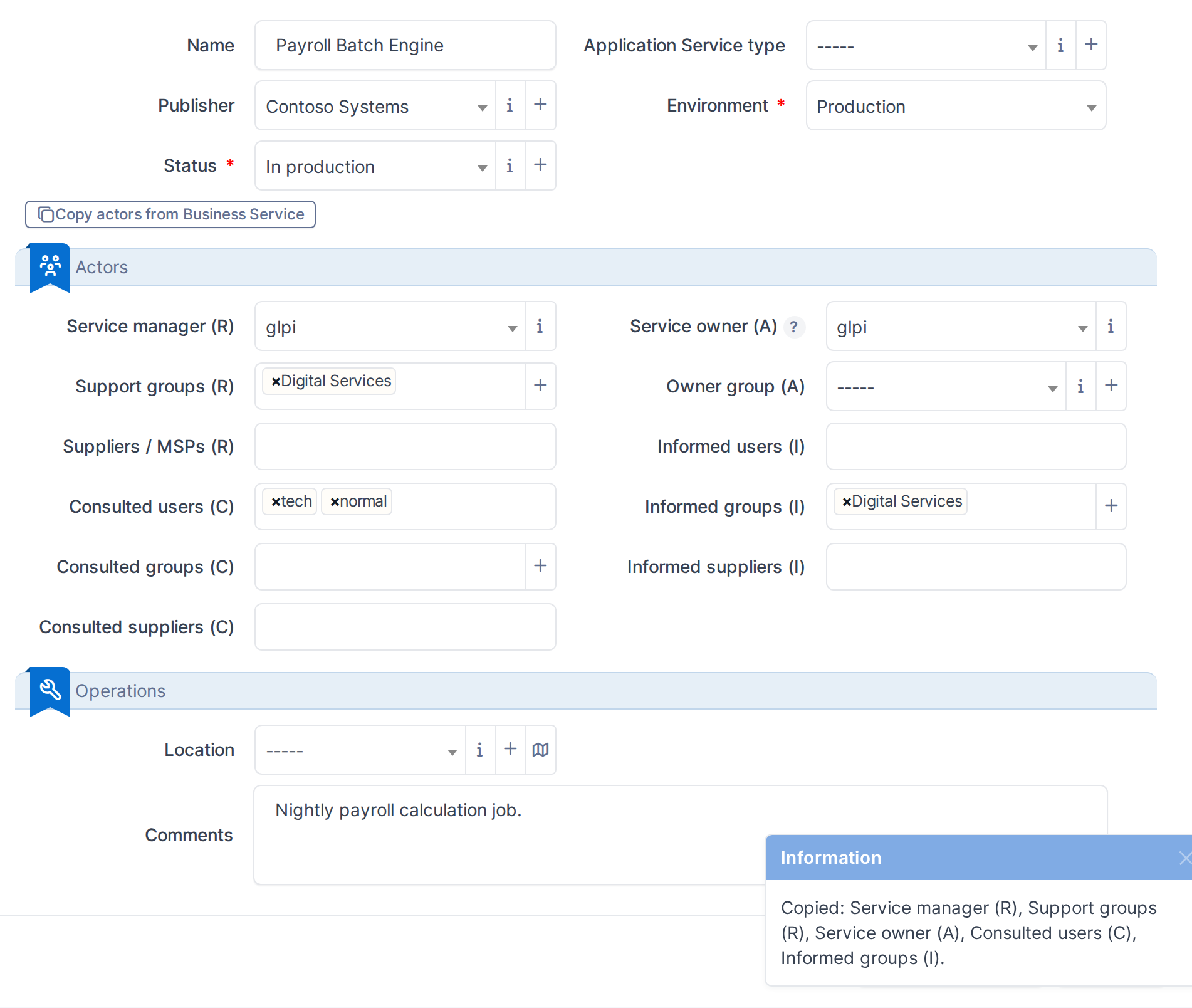
*Actors filled in from the linked Business Service*
> **Note:** The full Responsible/Accountable/Consulted/Informed assignment, including multiple users and groups per role, is covered in the RACI Matrix chapter.
> Generated for **BSM 0.21.0-beta.1** on GLPI 11.0.8 — 2026-09-13.
# 5.4 Service Map

*Part of the **BSM** manual — see also [1. Introduction](https://docs.tic.gal/books/bsm/page/1-introduction), [2. What's New](https://docs.tic.gal/books/bsm/page/2-whats-new), [3. Scope](https://docs.tic.gal/books/bsm/page/3-scope), [4. Setup](https://docs.tic.gal/books/bsm/page/4-setup), [5.1 How to use](https://docs.tic.gal/books/bsm/page/51-how-to-use), [5.2 Business Services](https://docs.tic.gal/books/bsm/page/52-business-services), [5.3 Application Services](https://docs.tic.gal/books/bsm/page/53-application-services), [5.5 RACI Matrix](https://docs.tic.gal/books/bsm/page/55-raci-matrix), [5.6 RACI summaries](https://docs.tic.gal/books/bsm/page/56-raci-summaries), [6. Troubleshooting](https://docs.tic.gal/books/bsm/page/6-troubleshooting).*
The Service Map is a diagram, available as a tab on any Business Service or Application Service, that draws how the service connects to the Application Services and infrastructure underneath it. It turns "what does this actually depend on?" into a picture instead of a search through unrelated records.
## 5.4.1 Open the Service Map tab
Open **Customer Identity Service** (an Application Service) and choose the **Service Map** tab. The diagram loads automatically, laying out every item linked to this service and grouping them — by default, by their role in the service.
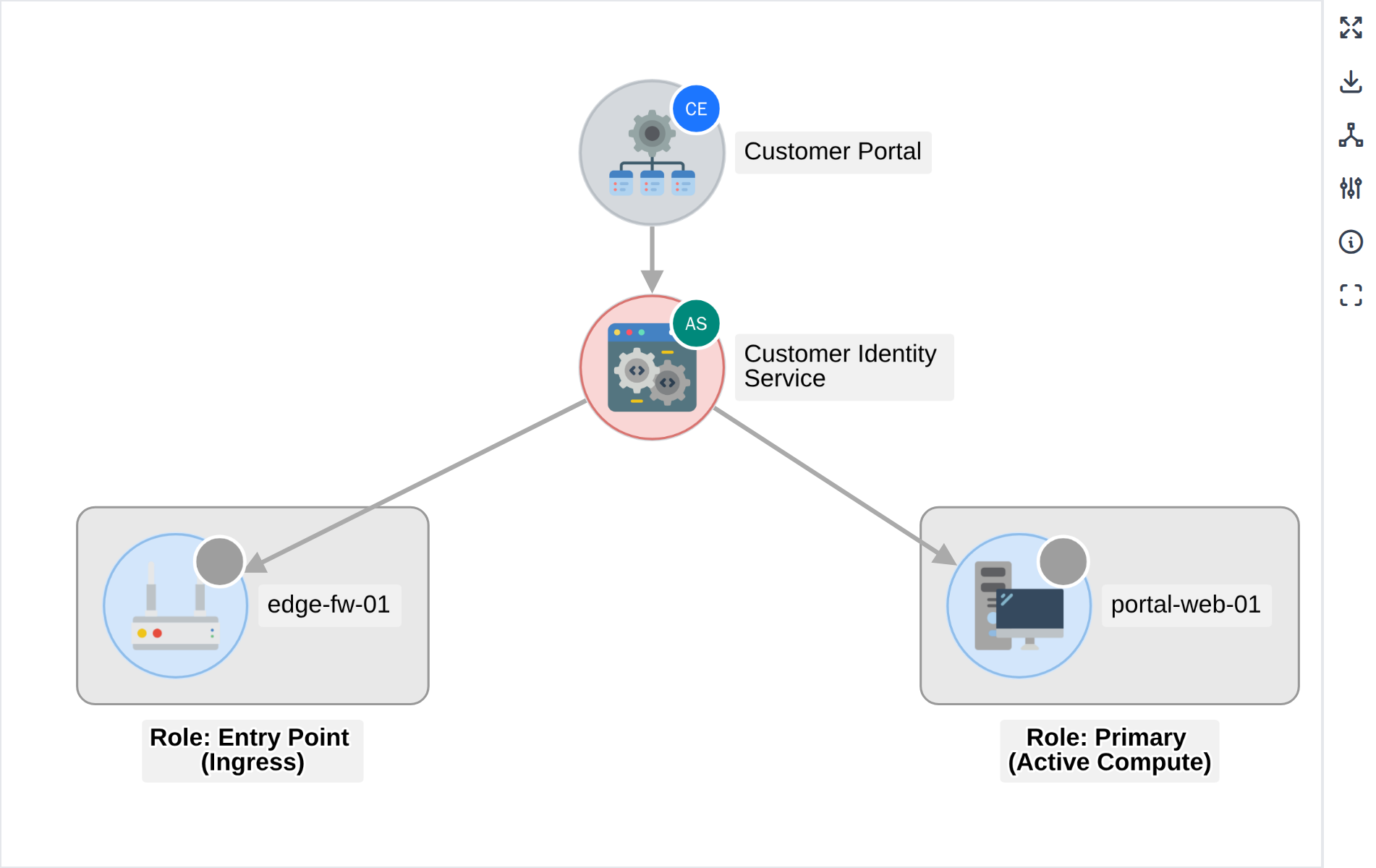
*The Service Map for an Application Service*
## 5.4.2 Change how items are grouped
Click the **Group by** icon in the side panel to choose a different grouping — for example, by **Item type** instead of Role. Each group is drawn as its own labelled box, and the label shows which grouping produced it.
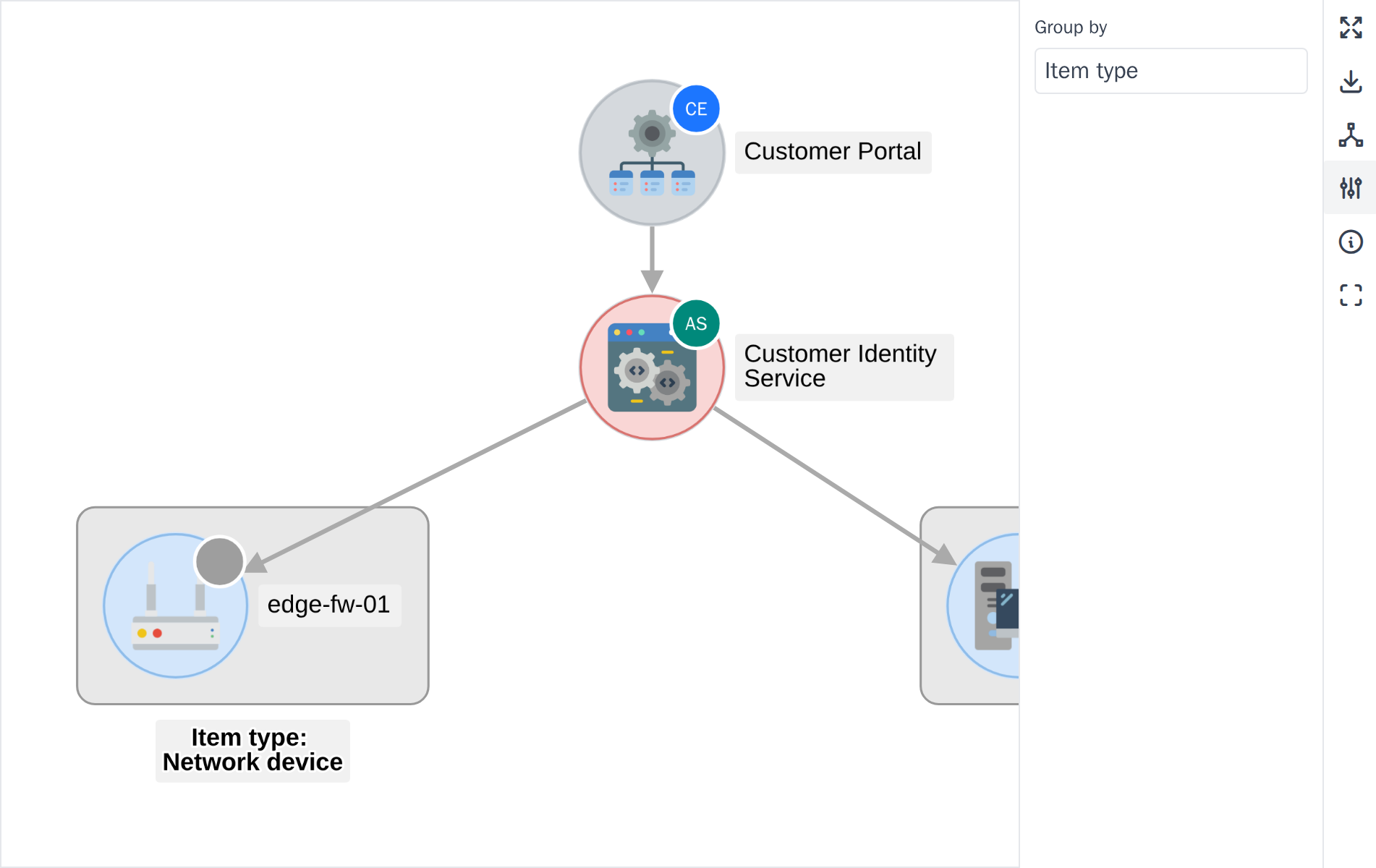
*Grouping by item type*
## 5.4.3 Read the Legend
Click the **Legend** icon to see what each colour and badge on the diagram means: tier colours, environment colours for Application Services, and the border style used for network equipment.
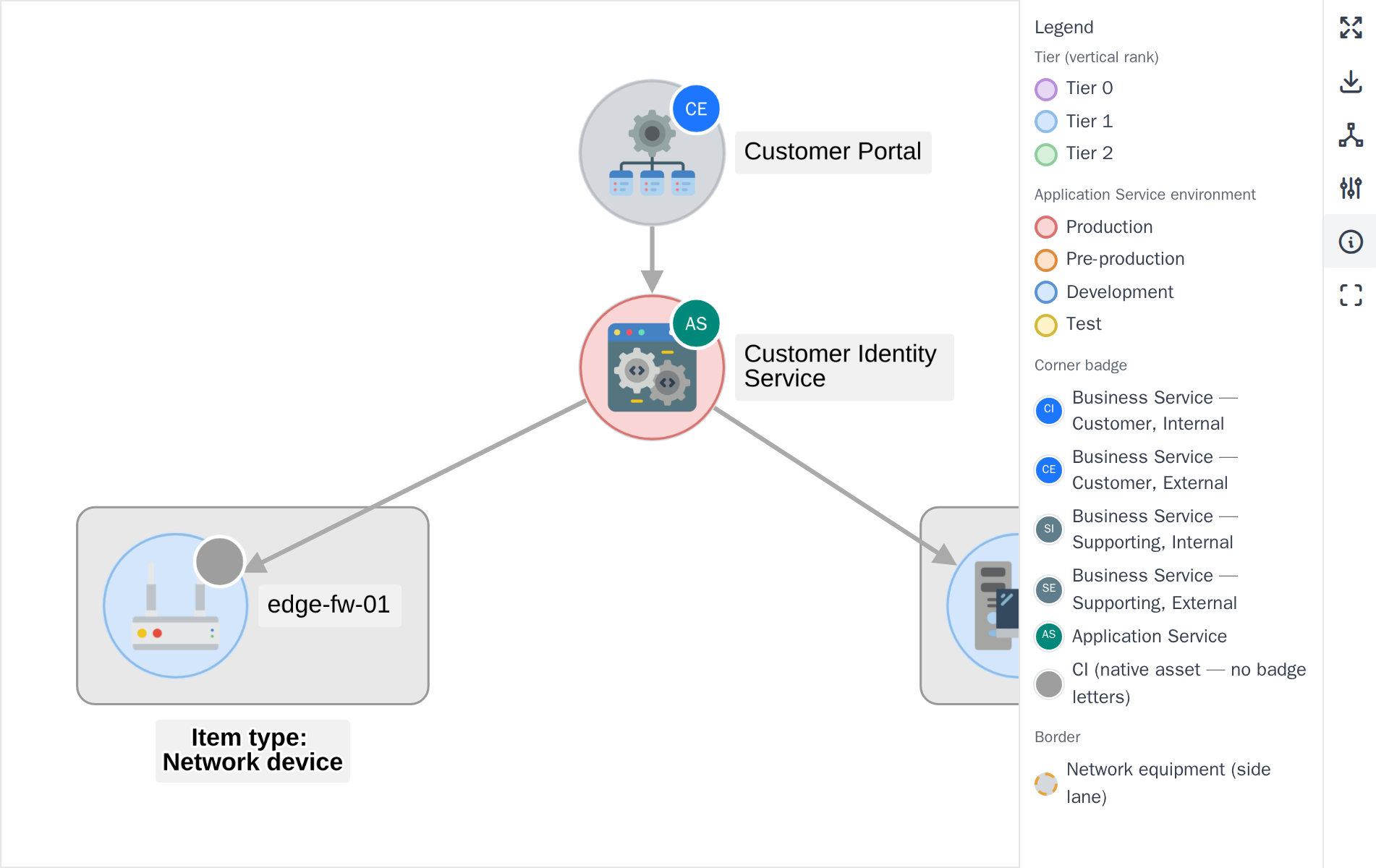
*The Legend panel*
## 5.4.4 View the diagram fullscreen
For a large or busy map, click the **fullscreen** icon to expand the diagram to fill the browser window. Click it again, or press the same icon, to return to the normal view.
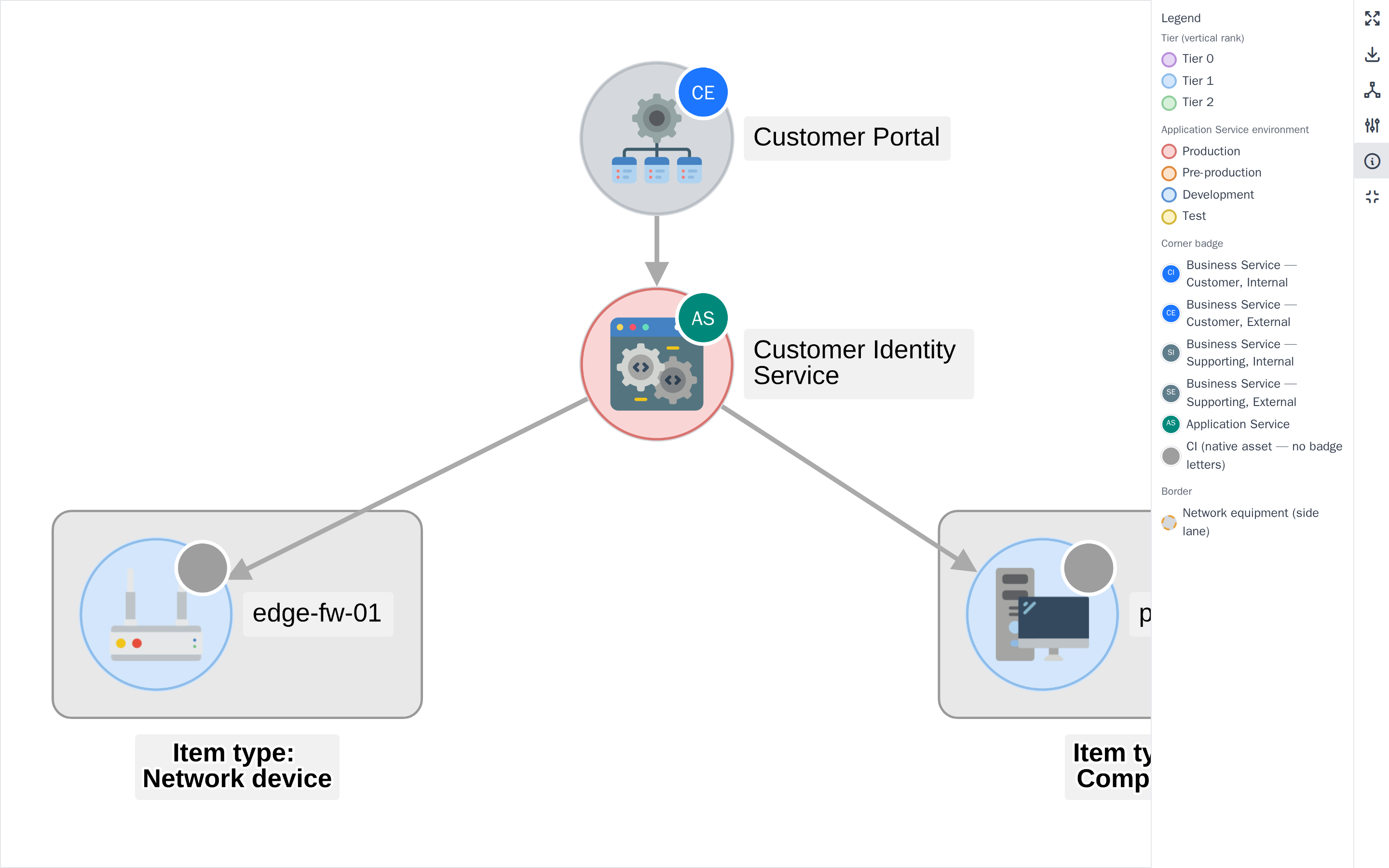
*The Service Map in fullscreen mode*
> **Note:** The Service Map only draws item types enabled in Setup > General > BSM, and draws every tier it can reach — opening the map from a Business Service also shows the Application Services and infrastructure beneath it, not just its immediate links.
> Generated for **BSM 0.21.0-beta.1** on GLPI 11.0.8 — 2026-09-13.
# 5.5 RACI Matrix

*Part of the **BSM** manual — see also [1. Introduction](https://docs.tic.gal/books/bsm/page/1-introduction), [2. What's New](https://docs.tic.gal/books/bsm/page/2-whats-new), [3. Scope](https://docs.tic.gal/books/bsm/page/3-scope), [4. Setup](https://docs.tic.gal/books/bsm/page/4-setup), [5.1 How to use](https://docs.tic.gal/books/bsm/page/51-how-to-use), [5.2 Business Services](https://docs.tic.gal/books/bsm/page/52-business-services), [5.3 Application Services](https://docs.tic.gal/books/bsm/page/53-application-services), [5.4 Service Map](https://docs.tic.gal/books/bsm/page/54-service-map), [5.6 RACI summaries](https://docs.tic.gal/books/bsm/page/56-raci-summaries), [6. Troubleshooting](https://docs.tic.gal/books/bsm/page/6-troubleshooting).*
The RACI Matrix is a single, read-only overview of every Business Service and the Application Services delivered under it, showing who is Responsible, Accountable, Consulted and Informed for each. It is the fastest way to check actor assignments across many services at once, without opening each record individually.
## 5.5.1 Open the RACI Matrix
Choose **RACI Matrix** from the BSM menu. Each Business Service row is followed by the Application Services delivered under it, indented one level. A summary line above the table counts services missing a Responsible or an Accountable actor, and an **Export to CSV** link downloads the currently filtered view.
The matrix itself is read-only — actors are assigned from each service's own form, not from here.
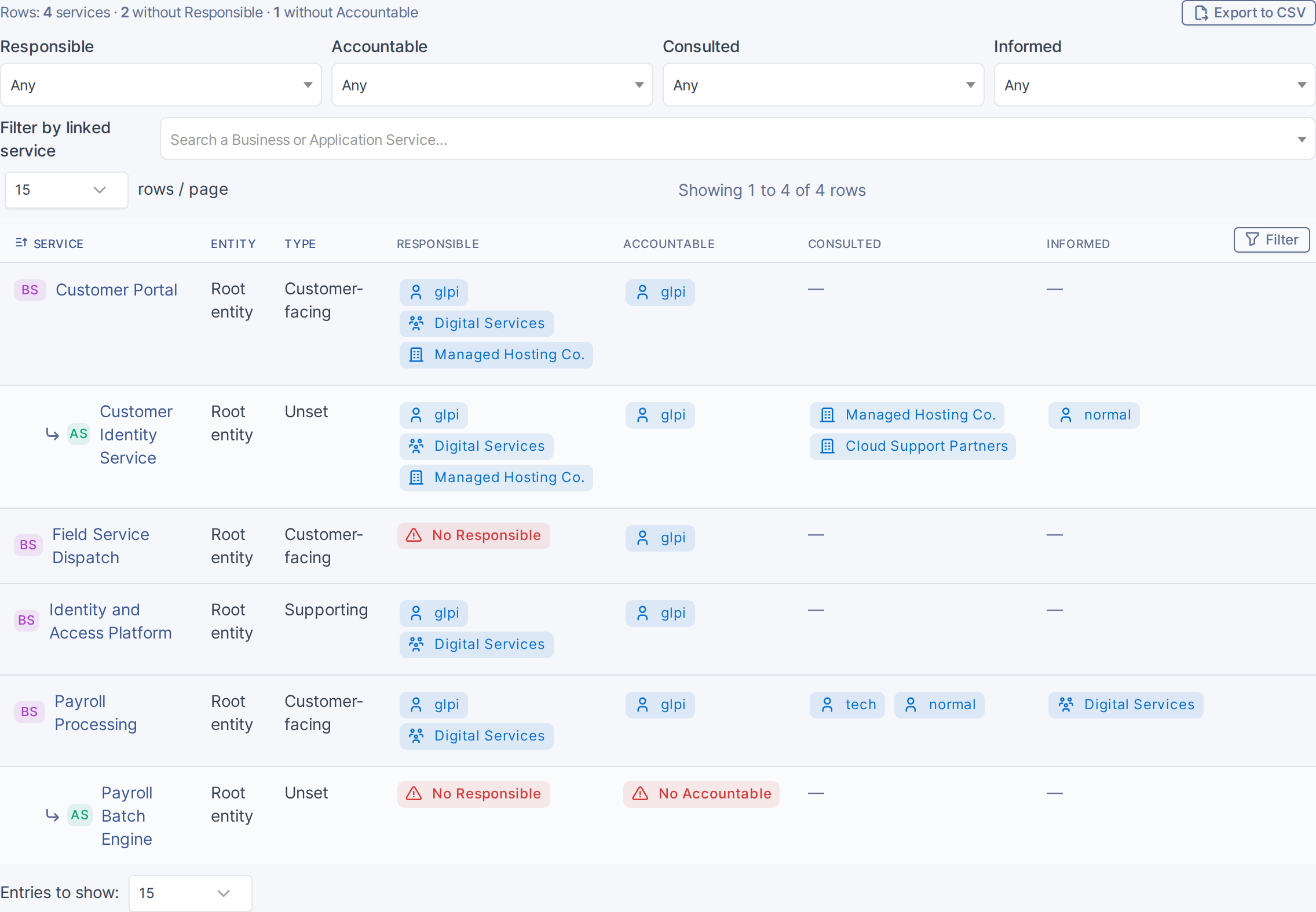
*The RACI Matrix*
## 5.5.2 Filter by actor
Four dropdowns, one per role, narrow the matrix to services where a specific user, group or supplier holds that role:
- Each dropdown only lists actors who actually hold that role somewhere in the matrix, not the whole directory.
- Selecting more than one role filters with **AND**: a service must match every role picked, but any one of its own actors in that role is enough to match.
This example filters Responsible to **glpi**.
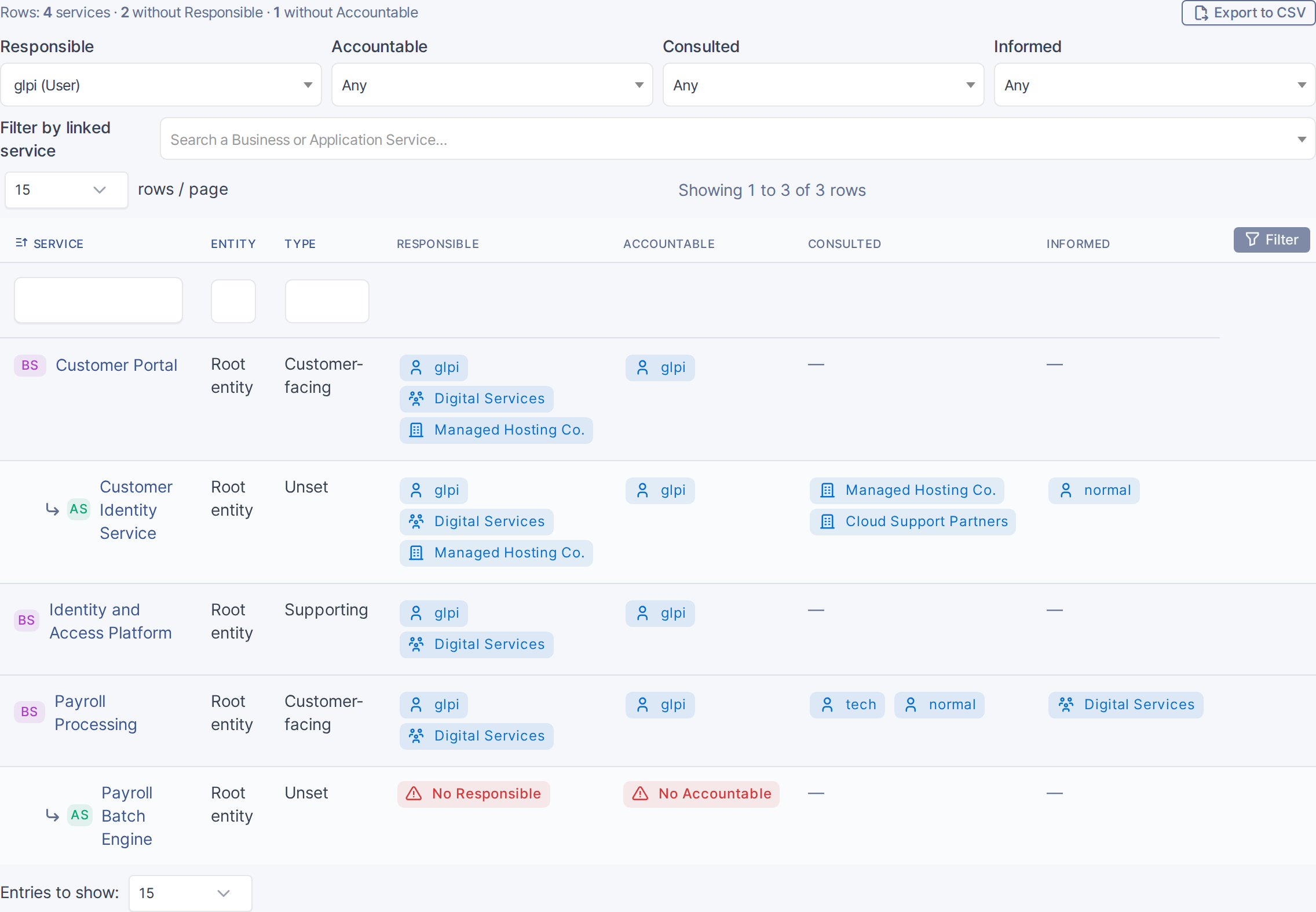
*Filtering the matrix by Responsible actor*
## 5.5.3 Filter by linked service
Pick a Business Service in **Filter by linked service** to also show every Application Service delivered under it, or pick an Application Service to also show the Business Service it is delivered under. This example filters by **Customer Portal**.
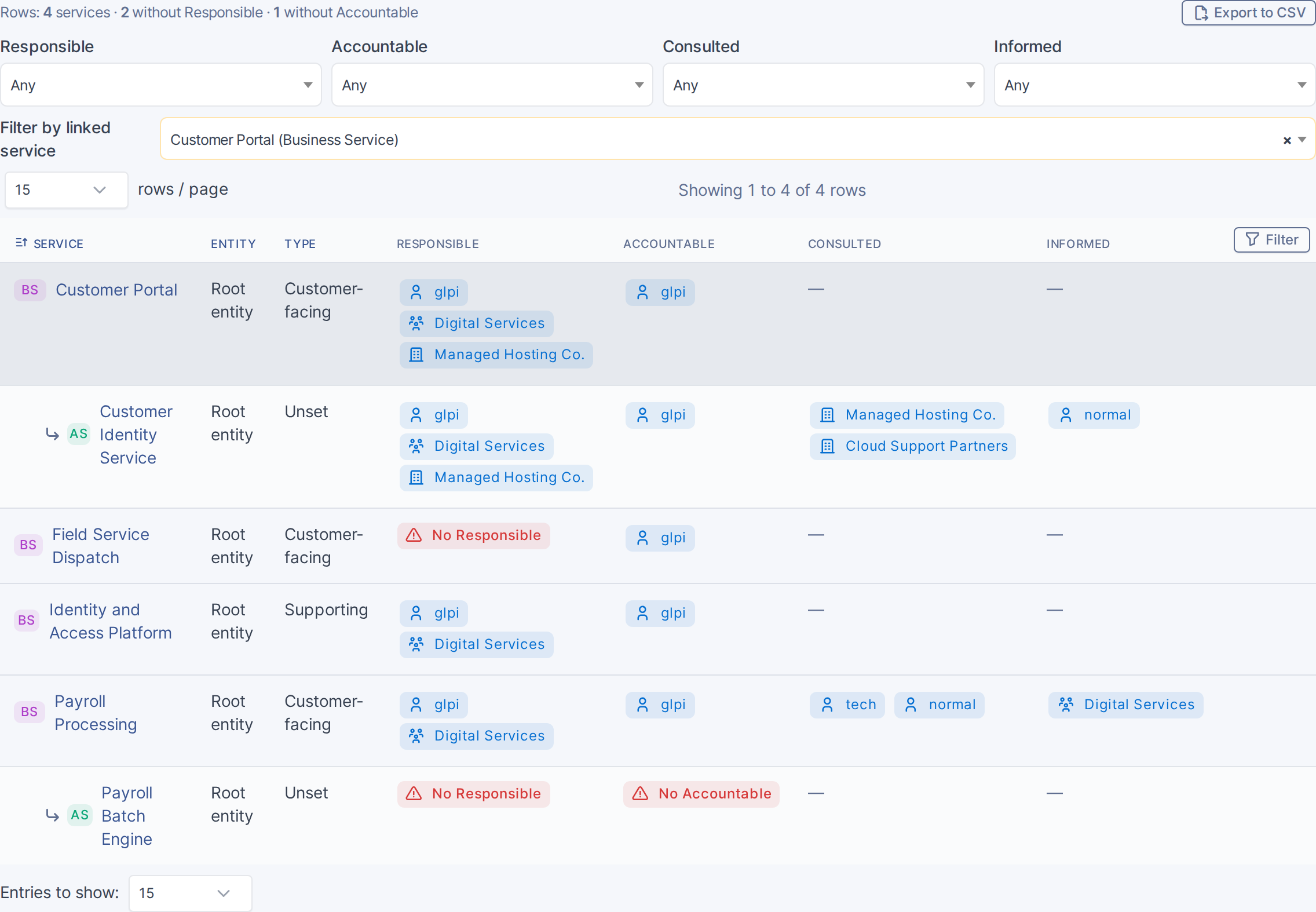
*Filtering by linked service*
> **Note:** Actors are assigned or changed from the Business Service or Application Service's own form — see the Actors step in those chapters — not from the matrix. A row still only shows actors the signed-in user has rights to see.
> Generated for **BSM 0.21.0-beta.1** on GLPI 11.0.8 — 2026-09-13.
# 6. Troubleshooting

*Part of the **BSM** manual — see also [1. Introduction](https://docs.tic.gal/books/bsm/page/1-introduction), [2. What's New](https://docs.tic.gal/books/bsm/page/2-whats-new), [3. Scope](https://docs.tic.gal/books/bsm/page/3-scope), [4. Setup](https://docs.tic.gal/books/bsm/page/4-setup), [5.1 How to use](https://docs.tic.gal/books/bsm/page/51-how-to-use), [5.2 Business Services](https://docs.tic.gal/books/bsm/page/52-business-services), [5.3 Application Services](https://docs.tic.gal/books/bsm/page/53-application-services), [5.4 Service Map](https://docs.tic.gal/books/bsm/page/54-service-map), [5.5 RACI Matrix](https://docs.tic.gal/books/bsm/page/55-raci-matrix), [5.6 RACI summaries](https://docs.tic.gal/books/bsm/page/56-raci-summaries).*
## I don't see the BSM menu, or a service's RACI tab is missing
BSM's menu entries and tabs only appear for a profile that has been granted the relevant right under **Administration > Profiles > (a profile) > BSM**: Business Service, Application Service, Configuration, and RACI Matrix each have their own Read/Create/Update/Delete right. A profile with none of these granted sees no BSM menu at all, not an error — check the profile's BSM tab first.
## I can't find a way to edit actors from the RACI Matrix page
The RACI Matrix is read-only by design — it's an overview, not an editor. To change who is Responsible, Accountable, Consulted or Informed for a service, open that service's own record (Business Service or Application Service) and edit its **Actors** section there; you need Update on that service's own tier to do so.
## The Business owner group list doesn't show the group I expected
The **Business owner group** picker on a Business Service is limited to groups the chosen **Business owner** actually belongs to. If the group you expect is missing, either it doesn't have that user as a member, or no owner has been selected yet — pick the owner first, then the group list narrows to their groups.
## The Service Map is missing assets I expect to see
The Service Map only draws asset types that are enabled in **Setup > General > BSM > Item types**, and software installations only if they are added to the **Tracked software** list there — an asset of an untracked type or an untracked software install is skipped entirely rather than shown greyed out. Check both lists if an expected node is missing.
## "Group by" boxes look empty or oddly grouped
Grouping is driven by the same Setup > General > BSM configuration (item type tiers, tracked software). An item that has never been assigned a tier falls back to an "Unassigned" grouping rather than being hidden — if a group looks unexpectedly full or empty, check the **Tiers** picker in Setup for that item type.
## The Status field on an Application Service has no options to choose from
Status is mandatory, but a State only appears there once it has been explicitly marked visible for Application Services — on a fresh install no State is marked that way yet, so the field starts empty. Open **Setup > Dropdowns > Statuses**, edit a State, and enable it for Application Services (or create a new one and do the same); it will then appear in the dropdown.
## The "Copy actors from Business Service" button did nothing, or isn't there at all
The button only appears once the Application Service is saved and linked to **exactly one** Business Service — it's hidden on a new, unsaved record, and clicking it on a service linked to zero or several Business Services shows a message explaining which of those is the case instead of copying anything. When it does run, it only fills fields that are currently empty: if Responsible or Accountable already has a value, that field is left untouched.
## Changes to a service's actors don't show on the Service Map or RACI Matrix immediately
Both views read the current state of the service records on each load; a hard refresh of the page resolves cases where a stale copy of the diagram or matrix was cached in the browser.
> Generated for **BSM 0.21.0-beta.1** on GLPI 11.0.8 — 2026-09-13.
# 5.6 RACI summaries

*Part of the **BSM** manual — see also [1. Introduction](https://docs.tic.gal/books/bsm/page/1-introduction), [2. What's New](https://docs.tic.gal/books/bsm/page/2-whats-new), [3. Scope](https://docs.tic.gal/books/bsm/page/3-scope), [4. Setup](https://docs.tic.gal/books/bsm/page/4-setup), [5.1 How to use](https://docs.tic.gal/books/bsm/page/51-how-to-use), [5.2 Business Services](https://docs.tic.gal/books/bsm/page/52-business-services), [5.3 Application Services](https://docs.tic.gal/books/bsm/page/53-application-services), [5.4 Service Map](https://docs.tic.gal/books/bsm/page/54-service-map), [5.5 RACI Matrix](https://docs.tic.gal/books/bsm/page/55-raci-matrix), [6. Troubleshooting](https://docs.tic.gal/books/bsm/page/6-troubleshooting).*
Besides the organisation-wide RACI Matrix and each service's own editable Actors section, BSM has two more read-only RACI views: a **Service RACI** tab on every Business Service and Application Service, and a **My RACI** / **RACI (as actor)** tab on a user, a group or a supplier. Neither one edits anything — both exist to answer "who/what is on the hook here?" from a different starting point.
## 5.6.1 View a single service's RACI (Service RACI tab)
Open any Business Service or Application Service and choose its **Service RACI** tab. It recaps that one service's Responsible, Accountable, Consulted and Informed actors — the same data as the RACI Matrix row for this service, just without the rest of the organisation around it — and a **View in matrix** button jumps straight to that row on the full Matrix. This example opens **Customer Portal**.
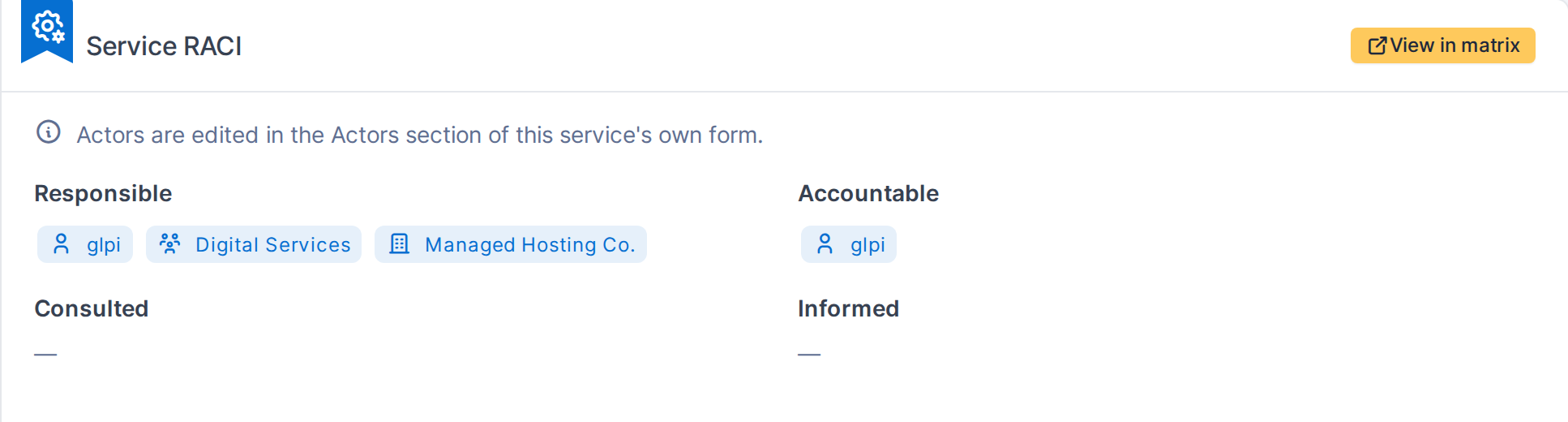
*The Service RACI tab*
## 5.6.2 View every service a user, group or supplier is on
Open a User, Group or Supplier record and choose its **RACI (as actor)** tab — it lists every service that person, team or supplier is named on, in which role(s), and (for a user) whether the role comes from their own assignment or from a group they belong to. The tab only appears when that actor has at least one assignment.
This example opens the **glpi** user record.
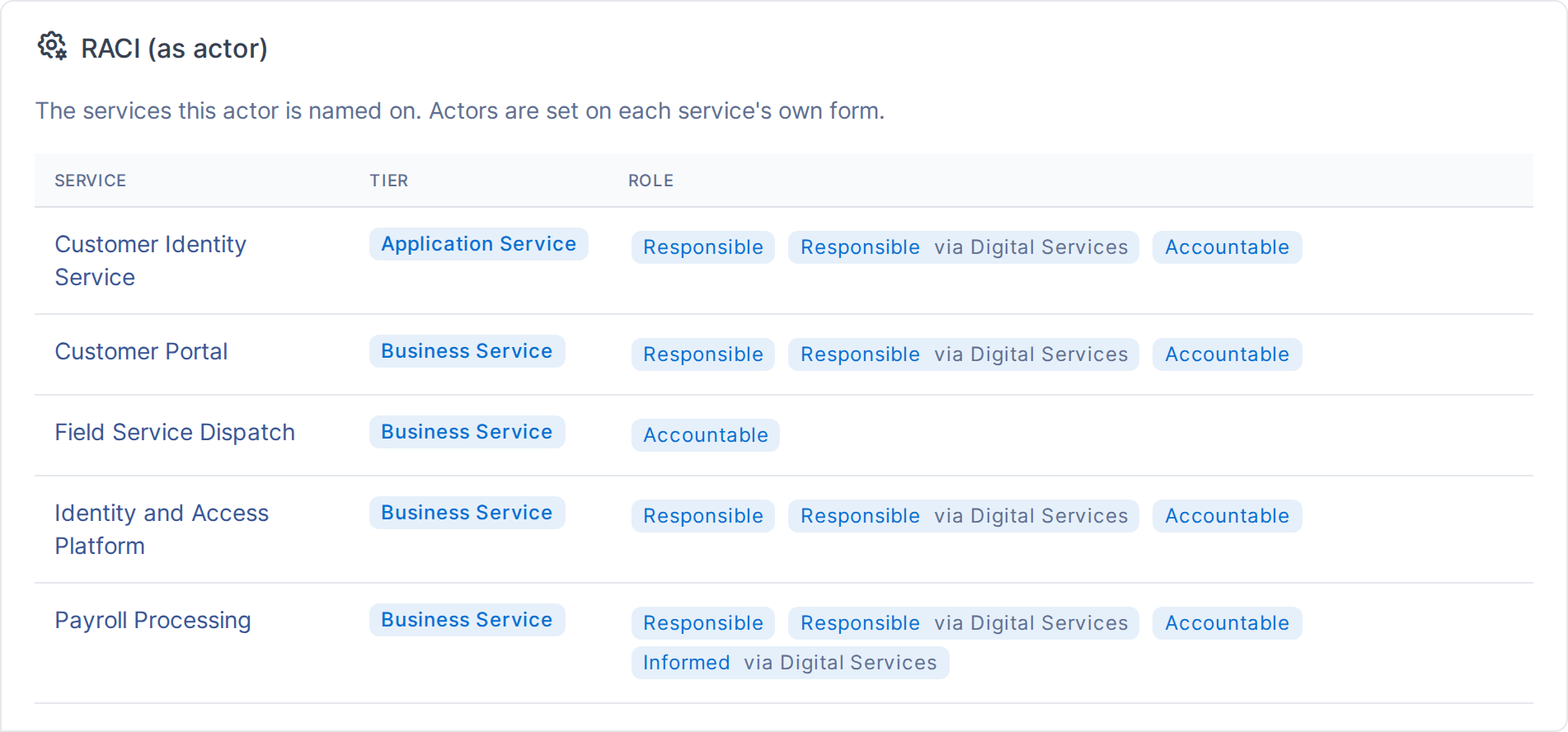
*The RACI (as actor) tab*
> **Note:** On your own user account, this same tab is titled **My RACI** and appears on Preferences as well as on your own User record — no BSM right is required to see your own assignments, only to look up someone else's.
> Generated for **BSM 0.21.0-beta.1** on GLPI 11.0.8 — 2026-09-13.